

Open in MS Edge™
40 rating
)

Ringkasan
Send the current page's link or all open tabs to the Microsoft Edge browser, or set optional rules for opening with a left-click.
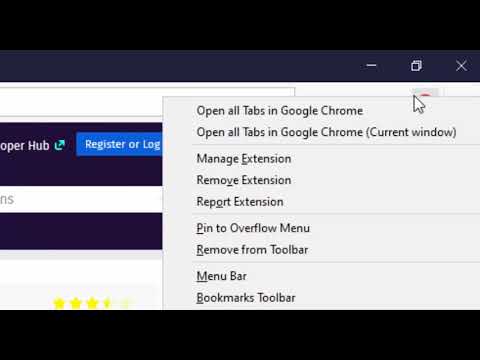
You can send HTML links to Microsoft's Edge browser with a single click. The extension includes a browser action button that, when activated, sends the URL from the active tab to the Edge browser. Optionally, you can instruct the extension to close the tab once the URL transfer is complete. It's important to note that, like similar extensions, this one requires a native component (macOS, Windows, and Linux) for communication with the external browser. Additionally, the extension enhances your productivity by adding a context menu option for links, allowing you to send them to the Edge browser with a simple right-click. To configure the extension to your needs, head to the options page and specify which hostnames should open in the Edge browser. Since the extension use a native component, it can initiate a new instance if it detects no open Edge windows. This component has a built-in tool to help you locate the Edge executable. The extension provides several context menu items within the browser action button, enabling you to send all tabs within the current window or across all windows to the Edge browser. Also, it has two context menu items for link and text selection. It will extract links from selection area and open links in the Edge browser. --- Legal Disclaimer Please be aware that 'Edge' is a registered trademark of Microsoft Inc. in the United States and other countries. This extension is an independent project and is not affiliated with the Edge team or Microsoft Inc. in any way.
3,9 dari 540 rating
Detail
- Versi0.3.4
- Diupdate15 Desember 2024
- Ditawarkan olehrynu.smith
- Ukuran223KiB
- Bahasa11 bahasa
- Developer
Email
rynu.smith@gmail.com - Non-pedagangDeveloper ini tidak mengidentifikasi diri sebagai pedagang. Bagi konsumen di Uni Eropa, perlu diperhatikan bahwa hak konsumen tidak berlaku untuk kontrak antara Anda dan developer ini.
Privasi

Developer ini menyatakan bahwa data Anda
- Tidak dijual ke pihak ketiga, di luar kasus penggunaan yang disetujui
- Tidak digunakan atau ditransfer untuk tujuan yang tidak terkait dengan fungsi inti item
- Tidak digunakan atau ditransfer untuk menentukan kelayakan kredit atau untuk tujuan pinjaman
Dukungan
Untuk mendapatkan bantuan terkait pertanyaan, saran, atau masalah, kunjungi situs dukungan developer