

Open in Firefox™ Browser
151 įvertinimas
)

Apžvalga
Open current page, link, or all tabs in the Firefox browser with a left-click or through right-click context menu.
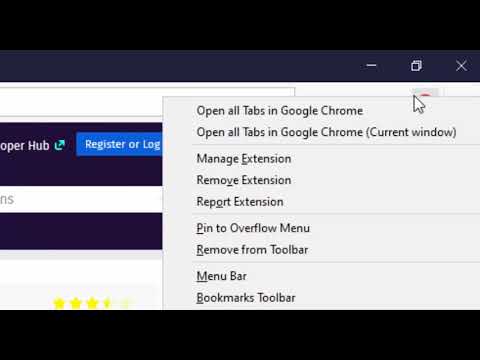
The "Open in Firefox" extension simplifies opening the current tab or links within the current tab in the Firefox browser. This functionality can be initiated via the right-click context menu, a toolbar button, or left-clicking on a link with or without a modifier key. This extension streamlines link transfer between different web browsers, eliminating the need to copy a link from one browser, paste it into the OS clipboard, and then paste it into another browser. Key Features: - Open a website's hostname directly in Firefox. - Open a specific URL in Firefox. - Launch all URLs containing a specific keyword in Firefox. - Optionally close the current tab after transferring a link. - Optionally, do not block the left-click action when transferring a link. - Support for managed storage, allowing administrators to configure extension settings. - Support for user-defined JS script to decide whether the link should be blocked and passed to the Firefox browser or not When the extension detects an open instance of the Firefox browser, it opens the link in a new browser tab. If no open Firefox instance is found, it initiates a new Firefox window. You can customize URLs or hostnames to be automatically redirected to Firefox from the options page. You also have the option to close the source tab once the link transfer is completed. This allows you to view a specific website in Firefox, even if Chrome is your primary browser. Important Notes: 1. To use this extension to open links in the Firefox browser, you'll need to install a minimal native client. Installation instructions for the native client are provided when you attempt to open a link. Additionally, there are two short video tutorials in the screenshot section, covering installation steps for both Windows and Linux or Mac operating systems. 2. This extension supports managed storage, allowing domain administrators to configure certain preferences. 3. It can send links via left-click, a combination of left-click and a keyboard meta key, or during top-level navigation. 4. As of now, there is no version available for Chrome OS. Legal Disclaimer: Firefox is a trademark of Mozilla Inc., registered in the U.S. and other countries. This extension is an independent project and is not affiliated with the Firefox team or Mozilla Inc.
3,5 iš 5151 įvertinimas
Išsami informacija
- Versija0.5.0
- Atnaujinta2026 m. sausio 29 d.
- Pasiūlėyokris.dev
- Dydis198KiB
- KalbosEnglish
- Kūrėjas
El. paštas
yokris.dev@gmail.com - Ne komercinės veiklos subjektasŠis kūrėjas neprisistato kaip prekiautojas. Informuojame vartotojus Europos Sąjungoje, kad jūsų ir šio kūrėjo sudarytoms sutartims vartotojų teisės netaikomos.
Privatumas

Šis kūrėjas pareiškia, kad jūsų duomenys yra
- Neparduodama trečiosioms šalims su patvirtintais naudojimo atvejais nesusijusiais tikslais
- nenaudojami ir neperkeliami su elemento pagrindinėmis funkcijomis nesusijusiais tikslais;
- nenaudojami ir neperkeliami, siekiant nustatyti kreditingumą, arba skolinimo tikslais.
Palaikymas
Jei turite klausimų, pasiūlymų arba problemų, apsilankykite kūrėjo palaikymo svetainėje.