

Open All Links in Tabs
1 rating
)
Overview
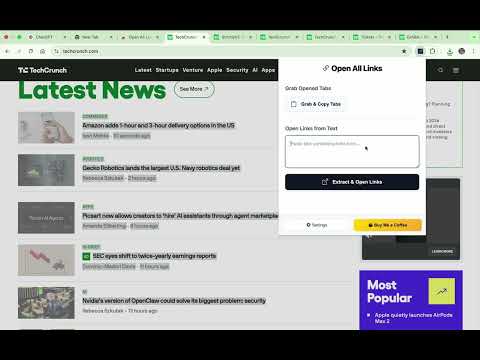
Extract links from text input and open each link in a separate tab. Perfect for quickly opening multiple URLs from copied text.
Open All Links in Tabs is a productivity-focused tool designed to streamline how you handle multiple URLs. Whether you are conducting research, managing social media, or organizing resources, this extension eliminates the tedious process of opening links one by one. Key Features: Instant Extraction: Paste any block of text—emails, documents, or notes—and the extension will automatically identify and extract all valid URLs. One-Click Open: Open all extracted links simultaneously in separate background tabs, allowing you to keep working without interruption. Grab All Tabs: Easily copy all currently opened tab URLs to your clipboard with a single click. Export to TXT: Save your current session or extracted lists directly to a text file for future reference. Smart Filtering: Automatically removes duplicate links and filters out invalid URLs to ensure a clean workflow. Preview Mode: See a clear list of extracted links before you open them to maintain full control. Why Choose Open All Links in Tabs? Built for efficiency, this extension supports standard http:// and https:// protocols as well as plain domain names. It features a built-in 100ms delay between opening tabs to ensure your browser remains stable and responsive, even when handling large lists. Privacy & Security: Your data stays with you. This extension processes all link extractions locally on your machine and does not track your browsing history or collect personal information.
5 out of 51 rating
Details
- Version2.2.0
- UpdatedMarch 25, 2026
- Size47.24KiB
- LanguagesEnglish
- Developer
Email
armanthecoder@gmail.com - Non-traderThis developer has not identified itself as a trader. For consumers in the European Union, please note that consumer rights do not apply to contracts between you and this developer.
Privacy

This developer declares that your data is
- Not being sold to third parties, outside of the approved use cases
- Not being used or transferred for purposes that are unrelated to the item's core functionality
- Not being used or transferred to determine creditworthiness or for lending purposes
Support
For help with questions, suggestions, or problems, visit the developer's support site