

TypePilot
1 rating
)
Overview
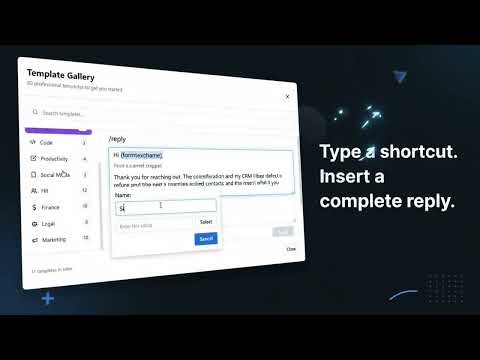
Text expander: type a shortcut like /reply to insert saved snippets, email templates and canned responses with forms and dates.
TypePilot is a fast, private text expander. Type a short shortcut like /reply, /thanks or /sig in any text field and it instantly expands into your saved snippet: an email template, a canned response, a signature or a whole message. Stop retyping the same emails, support replies, sales follow-ups and chat messages. Save them once as snippets and insert them anywhere on the web with a few keystrokes. HOW IT WORKS 1. Create a snippet: pick a shortcut (for example /thanks) and write the text it should insert. 2. Type the shortcut in any text field: email, chat, help desk, CRM, forms or documents. 3. If the snippet has fill-in fields, answer them in a small form. TypePilot inserts the finished text. WHAT'S NEW IN 1.2 • Snippet picker: press Ctrl+Shift+Space in any text field, search your snippets and press Enter to insert one right where you are typing. • Undo an expansion: expanded by mistake? Press Backspace right away to get your shortcut back. • Most used first: your most-used snippets rise to the top of the list. • Pause on a site: turn shortcuts off on any website with one click, and back on any time. • Backups: TypePilot keeps daily copies of your snippets that you can restore, and reminds you to export a backup file. • Works on the new Outlook web address. FEATURES • Text expansion everywhere: Gmail, Outlook on the web, chat apps, help desks, CRMs and most web editors. • Fill-in forms: ask for a name, order number or any detail with {formtext:name}, or offer choices with {formmenu:status:Open,Closed}. • Dynamic dates and times: {date}, {time}, {date:+3d} for "three days from now", {datetime:YYYY-MM-DD}. • Built-in math: {= price * 1.15} calculates totals, taxes and discounts as you insert. • Smart templates: show different text based on your answers with {if:...}{else}{endif}, or repeat lines with {repeat:...}{endrepeat}. • Clipboard, page address and site name: {clipboard}, {url}, {site}. • Cursor placement: {cursor} puts the caret exactly where you want to keep typing. • Rich text email templates with bold, links, lists and alignment. • Organize hundreds of snippets with folders, search and a full-page dashboard. • Ready-made templates and a Learn Center with copyable examples to get started in minutes. • Import snippets from JSON or CSV files, and export your whole library at any time. GREAT FOR • Customer support agents answering the same questions every day • Sales and recruiting outreach and follow-ups • Email signatures, greetings and meeting scheduling replies • Anyone who types the same text more than once PRIVATE BY DESIGN TypePilot reads what you type in web page text fields only to detect your shortcuts. That check happens on your device; typed text is never stored or sent anywhere. Your snippets are saved in your browser's local storage. TypePilot has no account, no server, no analytics and no ads, and it works offline. PERMISSIONS • "Read and change all your data on all websites": needed so your shortcuts work in any text field you choose to type in. TypePilot only reacts to your own shortcuts and only changes the field you are typing in. • Clipboard: used for the {clipboard} command and to paste snippets into editors that block other ways of inserting text. SUPPORT Questions or ideas? Email hos.gouda90@gmail.com or open an issue at https://github.com/HossamGouda/TYPEPILOT_PRIVACY_POLICY/issues
5 out of 51 rating
Details
- Version1.2.0
- UpdatedOctober 26, 2026
- Offered byHossam Gouda
- Size1.69MiB
- LanguagesEnglish
- Developer
Email
hos.gouda90@gmail.com - Non-traderThis developer has not identified itself as a trader. For consumers in the European Union, please note that consumer rights do not apply to contracts between you and this developer.
Privacy

This developer declares that your data is
- Not being sold to third parties, outside of the approved use cases
- Not being used or transferred for purposes that are unrelated to the item's core functionality
- Not being used or transferred to determine creditworthiness or for lending purposes
Support
For help with questions, suggestions, or problems, visit the developer's support site