


Overview
Turn any website or localhost into a shareable interactive preview or screenshot. Share with clients and collaborate.
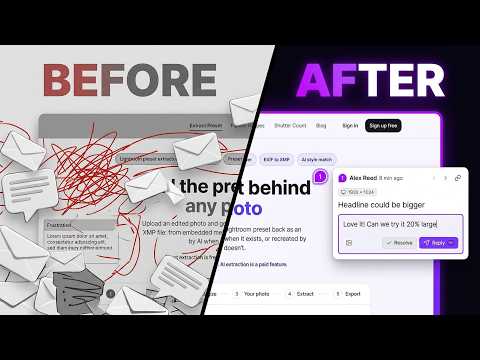
Stop decoding "the button on the second page looks off". Comnview puts feedback right where it belongs. Go to any website, including localhost, a staging site or something behind a login, and capture it with Comnview, right in your own browser, to get one link. Your client pins notes on the exact element, and you reply, fix and resolve in the same place, so nothing gets lost in email or chat. Use it to show a localhost build before it's deployed, get sign-off on a staging site, gather notes on a landing page before launch, point at the exact element that breaks, or let a client pick favourites from a moodboard. HOW IT WORKS 1. Capture: pick a mode and capture the tab you're on. 2. Share: copy the link or invite people by email. 3. Collect: reviewers open it in any browser, type their name once and point at the problem. 4. Resolve: reply in threads, fix the issue and mark it done. Whatever is still open is your to-do list. THREE MODES - Website: a live copy with its HTML, CSS, fonts and images. People scroll it, open menus and switch between phone, tablet and laptop widths. - Image: a full-length screenshot, top to bottom. - Both: the live copy and the screenshot together, so everyone picks the view that suits them. Each one is frozen in time: you keep building while the other side looks at exactly the version you sent. WHERE THE FEEDBACK HAPPENS - Pin a note on the exact element: no more "which button?" - Draw when words are not enough: pencil, lines, arrows, boxes and highlights. - Mobile notes stay on the mobile layout. - Threaded replies, with Open and Resolved lists. - Works on phones and tablets too: press and hold to place a pin. PRIVACY - Comnview reads only the tab you are on, and only when you capture it. It does not watch or record your browsing. - Capture runs in your browser: nothing gets deployed and no tunnel is set up. - Every project gets a unique, unguessable address, with optional password protection. - Only that copy is shared. Your source code stays on your machine.
0 out of 5No ratings
Details
- Version1.3.0
- UpdatedOctober 27, 2026
- Size159KiB
- LanguagesEnglish
- DeveloperWebsite
Email
support@comnview.com - Non-traderThis developer has not identified itself as a trader. For consumers in the European Union, please note that consumer rights do not apply to contracts between you and this developer.
Privacy

COMNVIEW has disclosed the following information regarding the collection and usage of your data. More detailed information can be found in the developer's privacy policy.
COMNVIEW handles the following:
This developer declares that your data is
- Not being sold to third parties, outside of the approved use cases
- Not being used or transferred for purposes that are unrelated to the item's core functionality
- Not being used or transferred to determine creditworthiness or for lending purposes
Support
For help with questions, suggestions, or problems, visit the developer's support site