


Overview
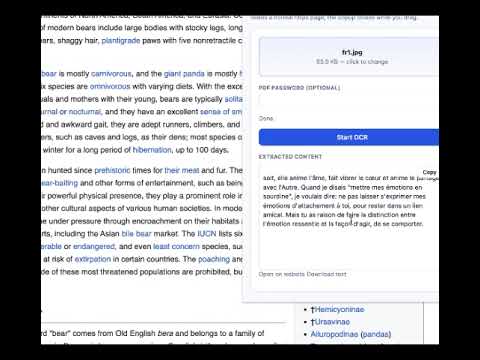
Capture a tab, a screen area, or a file — OCR with your OnlineOCR account (same API as the website).
OnlineOCR brings powerful text recognition directly into your browser - using the same trusted service available on onlineocr.org. Convert images, documents, and on-screen content into editable text in just a few clicks, without leaving Chrome. HOW IT WORKS • Sign in or create an OnlineOCR account directly in the extension. • Already logged in on onlineocr.org? Your session is automatically reused. • Choose your input method: – Upload an image or document from your computer – Capture the current browser tab – Select a custom screen region for precise OCR • Select recognition language and options based on your plan. • Track progress in real time and download results instantly. KEY FEATURES • Fast and accurate OCR powered by OnlineOCR.org • Multiple input options: file, full tab, or selected area • Seamless account integration (same credits & history) • No need to open the website — everything works inside Chrome • Simple and clean interface YOUR ACCOUNT This extension works with your OnlineOCR.org account. All credits, usage limits, and premium features are identical to the website. PRIVACY & DATA Files and images are securely sent to OnlineOCR servers for processing, just like when using the website. Please review the privacy policy linked in this listing for full details.
5 out of 52 ratings
Details
- Version0.6.3
- UpdatedApril 10, 2026
- Size128KiB
- LanguagesEnglish
- DeveloperWebsite
Email
websts.in@gmail.com - Non-traderThis developer has not identified itself as a trader. For consumers in the European Union, please note that consumer rights do not apply to contracts between you and this developer.
Privacy

OnlineOCR has disclosed the following information regarding the collection and usage of your data. More detailed information can be found in the developer's privacy policy.
OnlineOCR handles the following:
This developer declares that your data is
- Not being sold to third parties, outside of the approved use cases
- Not being used or transferred for purposes that are unrelated to the item's core functionality
- Not being used or transferred to determine creditworthiness or for lending purposes
Support
For help with questions, suggestions, or problems, visit the developer's support site