

OnePage PDF - Save Full Webpage as Clean PDF

Overview
Save any webpage as one uncut, full-page PDF that looks just like your screen—with working links, copyable text, and 1-click speed.
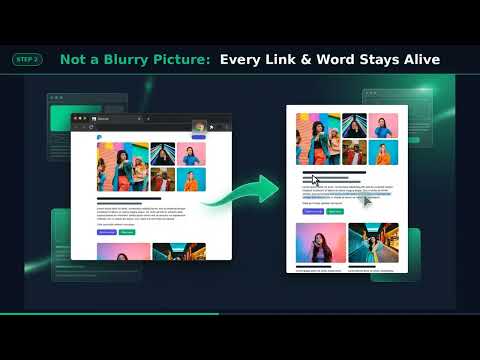
Save any webpage as a clean, full-page PDF that looks just like your screen. Pressing Ctrl+P ruins webpages—it strips out colors, scrambles layouts, slices pictures in half across pages, and repeats floating top menus over your text. Screenshot tools aren't much better, leaving you with a giant image where you can't click links or copy a single word. OnePage PDF fixes both in one click. What it does: • Saves as One Uncut Page (or A4 / Letter): Keep the entire webpage on a single continuous sheet with zero awkward page breaks, or choose standard paper sizes whenever you want to print. • Keeps the Exact Screen Look: Preserves the website's real colors, backgrounds, and side-by-side layout. • Keeps Links & Text Alive: Click any link, highlight and copy text, and press Ctrl+F to search words inside your PDF. • Fixes Floating Top Bars: Unpins sticky top menus so they don't stamp themselves across the middle of your page. • Never Reloads Your Tab: Saves the page as-is so you never lose filled-out forms, receipts, or your scroll spot. • 100% Private & Offline: Works entirely inside your browser—your pages are never sent to any outside server. How to use it in 3 seconds: Open any webpage, receipt, article, or dashboard. Click OnePage PDF and choose One Long Page or A4 / Letter. Click Save Webpage as PDF—done!
0 out of 5No ratings
Details
- Version1.0.0
- UpdatedOctober 21, 2026
- Offered bydevac2276
- Size43.25KiB
- LanguagesEnglish (United States)
- Developer
Email
devac2276@gmail.com - Non-traderThis developer has not identified itself as a trader. For consumers in the European Union, please note that consumer rights do not apply to contracts between you and this developer.
Privacy

This developer declares that your data is
- Not being sold to third parties, outside of the approved use cases
- Not being used or transferred for purposes that are unrelated to the item's core functionality
- Not being used or transferred to determine creditworthiness or for lending purposes