


Overview
Turn web highlights into daily AI quizzes. Spaced repetition for reading retention - remember what you read, automatically.
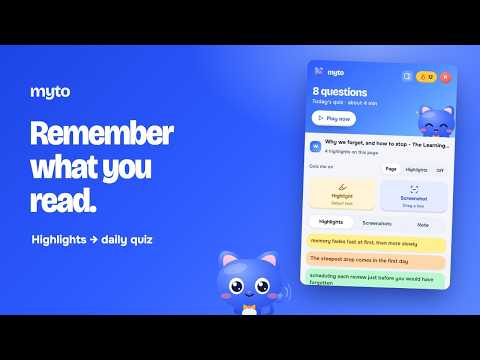
Myto turns what you highlight on the web into a short daily quiz, so what you read actually sticks. Most of what we read is forgotten within days. Highlighting alone doesn't fix that; being asked about it later does. Myto reads the page you saved from, writes questions about the ideas in it, and schedules them with FSRS spaced repetition, so each one comes back just before you would forget it. HOW IT WORKS • Select text on any page and save it from the pill that appears, the popup, the right-click menu or a keyboard shortcut. Pick a colour, star the important ones, and add a note to any highlight. • Capture a chart, diagram or slide as a screenshot (Pro). • Highlight PDFs in Myto's built-in PDF viewer (Pro). • Save from a YouTube video and Myto attaches its transcript, so you're quizzed on what was said. • Choose how each page is quizzed: the whole page, only your highlights and screenshots, or not at all. You can also save a page for your quiz without highlighting anything. • Open today's quiz from the popup and answer a few questions a day: multiple choice, fill in the blank, and questions about your screenshots. NEW IN 4.0.0 • A fresh design for the popup and side panel, and a new Myto icon. • The side panel sits beside the page you're reading: your highlights with their notes, your screenshots full size with their captions, and your page note. Click a highlight to jump to it. • Page notes: jot down what you took from a page, and Myto uses it when it writes your questions (Pro). • Every quiz answer comes with an explanation and the passage it came from, on every plan. • Daily streaks with streak freezes, XP, and a practice round to keep your streak on days nothing is due. • Settings open right inside the popup: Light, Dark or Auto theme, keyboard shortcuts and your account. FREE AND PRO Free, for good: highlights on up to 10 sources, daily AI quizzes with spaced repetition, explanations for every answer, and streaks. Pro: unlimited sources, screenshots, PDF highlighting, page notes, YouTube chapters and jump-back timestamps, and the highlight keyboard shortcut. Every new account starts with 14 days of Pro, no card needed. No account yet? You can start highlighting right away. Highlights stay in this browser until you make a free account, then they sync. PRIVACY Myto never asks for access to every site up front. It works on a site only after you turn it on for that site, and sends a page's text to Myto's own servers only when you save something from it, to write your questions. While you're signed in, Myto looks up the address of the page in your current tab in your own library, so it can show that page's highlights and quiz setting. Myto never sells your data. Privacy policy: https://usemyto.com/privacy
5 out of 52 ratings
Details
- Version4.0.0
- UpdatedOctober 6, 2026
- FeaturesOffers in-app purchases
- Size1.27MiB
- LanguagesEnglish
- DeveloperShubham PrasadWebsite
Nil Ratan Street, Mahavir Chowk Ranchi, Jharkhand 834001 INEmail
support@usemyto.comPhone
+91 84349 28148 - TraderThis developer has identified itself as a trader per the definition from the European Union and committed to only offer products or services that comply with EU laws.
Privacy

Myto has disclosed the following information regarding the collection and usage of your data. More detailed information can be found in the developer's privacy policy.
Myto handles the following:
This developer declares that your data is
- Not being sold to third parties, outside of the approved use cases
- Not being used or transferred for purposes that are unrelated to the item's core functionality
- Not being used or transferred to determine creditworthiness or for lending purposes
Support
For help with questions, suggestions, or problems, visit the developer's support site