

OneDrive Bulk Downloader
1 rating
)
Overview
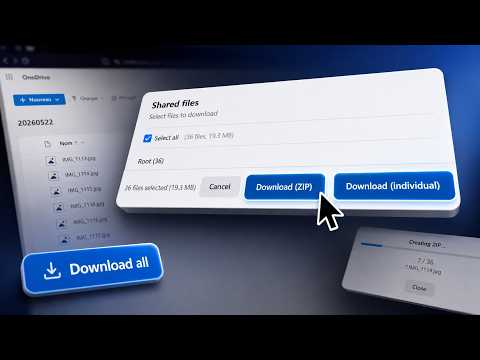
Download all files from a shared OneDrive folder in one click, without a Microsoft account.
Stop downloading OneDrive files one by one. When someone shares a OneDrive folder with you, this extension adds a "Download All" button to the page. Select the files you want, then choose between downloading them individually or as a single ZIP archive. Features: - One-click download of all files from any shared OneDrive folder - File selection — download specific files or the entire folder - ZIP archive mode — get everything in a single compressed file - Individual file mode — preserve original file names and folder structure - Recursive folder support — downloads files from subfolders too - No Microsoft account required — works with public shared links only - Language support: English and Français (switch in extension options) - Privacy-first: zero data collection, no external servers Simply open any OneDrive sharing link (1drv.ms or onedrive.live.com), click the blue "Download All" button in the bottom-right corner, and choose your preferred download method.
5 out of 51 rating
Details
- Version1.0.1
- UpdatedJuly 21, 2026
- Offered bytekly.fr
- Size70.65KiB
- LanguagesEnglish
- Developer
Email
contact@tekly.fr - Non-traderThis developer has not identified itself as a trader. For consumers in the European Union, please note that consumer rights do not apply to contracts between you and this developer.
Privacy

OneDrive Bulk Downloader has disclosed the following information regarding the collection and usage of your data. More detailed information can be found in the developer's privacy policy.
OneDrive Bulk Downloader handles the following:
This developer declares that your data is
- Not being sold to third parties, outside of the approved use cases
- Not being used or transferred for purposes that are unrelated to the item's core functionality
- Not being used or transferred to determine creditworthiness or for lending purposes
Support
For help with questions, suggestions, or problems, please open this page on your desktop browser