

OneAudio
1 rating
)
Overview
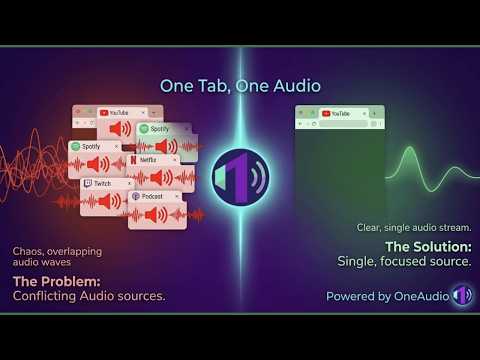
Automatically pauses audio and video on previous tabs when a new tab starts playing. One tab plays at a time.
OneAudio - One Tab, One Audio. Tired of juggling multiple tabs to figure out which one is making noise? OneAudio is a smart audio manager that ensures only one tab plays audio or video at a time — automatically, silently, and without any effort from you. ────────────────────────────────────── HOW IT WORKS ────────────────────────────────────── When you switch to a new tab and start playing audio or video, OneAudio automatically pauses the previous tab — not mutes it, actually pauses it. Your video stops at the exact frame you left. Your song stops at the exact second. When you come back, press play and continue from where you left off. No more: - Scrambling to find which tab is making noise - Two songs are playing over each other - A YouTube video blaring in the background while you are on Spotify - Accidentally leaving a podcast running for hours ────────────────────────────────────── PAUSE NOT MUTE — WHY IT MATTERS ────────────────────────────────────── Most tab audio extensions simply mute the other tab. OneAudio actually pauses it. Here is why that matters: - Muting keeps the video running in the background, consuming CPU, RAM and battery, even when you cannot hear it - Pausing stops the video completely — saving battery, reducing memory usage, and keeping your browser fast - You never lose your place in a video or podcast - No surprise auto-play resume when you come back - Cleaner, smarter, more intentional browsing ────────────────────────────────────── WORKS EVERYWHERE ────────────────────────────────────── OneAudio works on virtually every website that plays audio or video: - YouTube: videos, live streams, premieres - YouTube Shorts: all Shorts are tracked and paused correctly. Multiple Shorts playing at once? OneAudio handles all of them - Spotify Web Player: full song and playlist support - Instagram Reels: pauses Reels when you switch tabs - Instagram Stories: handled separately from Reels - Dailymotion: including iframe-embedded players - JioSaavn: web player support - Twitch: live streams and VODs - Netflix: movie and series playback - Vimeo: embedded and direct players - SoundCloud: tracks and playlists - Any website with a standard HTML5 video or audio player - news sites, blogs, streaming platforms, educational sites, and more ────────────────────────────────────── MULTI-WINDOW SUPPORT ────────────────────────────────────── OneAudio works seamlessly across multiple Chrome windows. If you have Spotify open in Window 1 and YouTube open in Window 2, switching between windows and starting playback in one will automatically pause the other. No configuration needed. ────────────────────────────────────── AUDIO FOCUS ANALYTICS ────────────────────────────────────── Ever wondered how much time you actually spend listening to music or watching videos? OneAudio tracks your audio sessions and gives you a detailed breakdown. FOCUS VIEW - See your top 5 most listened-to sites for any day - Active time - time you were actually on the tab watching or listening - Background time - time the audio was playing while you were on a different tab (shown separately in brackets) - Click any site to drill down into individual titles - see Exactly which YouTube videos or Spotify songs you spent the most time on - YouTube Shorts are grouped as "YouTube Shorts" instead of showing hundreds of individual short video titles - Instagram Reels grouped as "Instagram Reels" - Instagram Stories grouped as "Instagram Stories" - Clean, clutter-free — no noise from one-second accidental plays TIMELINE VIEW - Hourly stacked bar chart showing your audio activity across the full day - Each bar is colour-coded by site - instantly see when you were on YouTube vs Spotify vs anything else - Click any hour to see a detailed breakdown of which sites contributed to that hour and how many minutes each consumed - Perfect for understanding your daily listening and watching patterns at a glance SEVEN DAY HISTORY - Analytics covers the past 7 days - Switch between days using the day tabs at the top - Data older than 7 days is automatically deleted - no manual cleanup needed - You can also manually clear data for any specific day with one click - Or clear everything at once if you want a fresh start ────────────────────────────────────── EXPORT YOUR DATA ────────────────────────────────────── Want to analyse your listening habits further? Export any day's sessions as a CSV file with one click. Each row includes the site, title, type (active or background), start time, end time, and duration in minutes. Open it in Excel, Google Sheets, or any spreadsheet tool. ────────────────────────────────────── COMPLETELY PRIVATE - ALL OFFLINE ────────────────────────────────────── OneAudio works 100% offline. There is no account to create, no server to connect to, and no data ever leaves your device. - All session data is stored locally in your browser using Chrome's built-in storage - No analytics sent anywhere - No tracking of what you watch or listen to on any server - No third party services - No internet connection required after installation - Even the analytics dashboard reads directly from your local browser storage Your listening habits are yours alone. ────────────────────────────────────── SIMPLE AND LIGHTWEIGHT ────────────────────────────────────── OneAudio runs quietly in the background as a Chrome service worker. It uses minimal memory and CPU. The pop-up shows you what is currently playing and what was last paused — clean, simple, no clutter. You can disable OneAudio at any time with the toggle in the pop-up without uninstalling it. Re-enable it just as easily. ────────────────────────────────────── PERFECT FOR ────────────────────────────────────── - Students studying with background music who open lecture videos - Remote workers who jump between music and video calls - Anyone who listens to Spotify while browsing YouTube - People who watch YouTube Shorts and forget other tabs are playing - Heavy tab users who always have 10 or more tabs open - Anyone who has ever said, "Which tab is making that noise" ────────────────────────────────────── ONE TAB. ONE AUDIO. ────────────────────────────────────── OneAudio is the smartest, cleanest way to manage audio across your browser. Install it once and never think about overlapping audio again.
5 out of 51 rating
Details
- Version1.0
- UpdatedJune 20, 2026
- Offered byoneclickextensions
- Size91.9KiB
- LanguagesEnglish
- Developer
Email
oneclickextensions@gmail.com - Non-traderThis developer has not identified itself as a trader. For consumers in the European Union, please note that consumer rights do not apply to contracts between you and this developer.
Privacy

OneAudio has disclosed the following information regarding the collection and usage of your data. More detailed information can be found in the developer's privacy policy.
OneAudio handles the following:
This developer declares that your data is
- Not being sold to third parties, outside of the approved use cases
- Not being used or transferred for purposes that are unrelated to the item's core functionality
- Not being used or transferred to determine creditworthiness or for lending purposes
Support
For help with questions, suggestions, or problems, visit the developer's support site