

One Set AI - All AI in One Sidebar | TOMOSIA VN
9 ratings
)
Overview
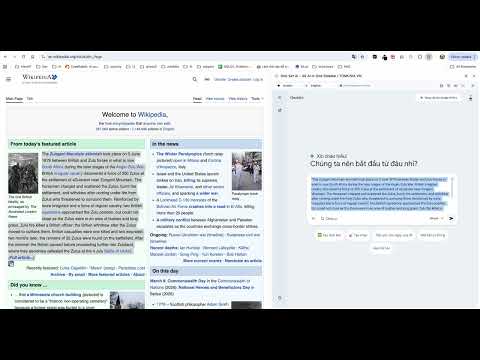
Access multiple AI chatbots (ChatGPT, Claude, Gemini) side-by-side in your browser sidebar, with paste and screenshot tools.
One Set AI – All AI in One Sidebar One Set AI brings multiple AI chatbots into a single browser sidebar so you can switch between ChatGPT, Claude, Gemini, and other providers without opening many tabs. What you can do One sidebar for all AIs – Open the side panel and choose the AI (e.g. ChatGPT, Claude, Gemini). Each chat runs in its own iframe so you keep context per provider. Paste page content – Send the main text of the current page to the chat (e.g. for summarising or answering questions about the page). Paste page as HTML – Send cleaned HTML of the page for layout/structure analysis. Capture screen – Take a screenshot and paste it into the chat in one click. Crop from page – Select a region on the page, capture it as an image, and paste it into the chat (useful for explaining parts of a page or UI). Inject selection with prompts – Select text on any page, use the context menu, and send it to the sidebar chat with optional custom prompts (e.g. “Translate”, “Summarise”, “Explain”). Multi-language UI – The extension interface supports English, Vietnamese, and Japanese. Why install it Save time by keeping all AIs in one place and reusing the same paste/capture flows. Compare answers from different AIs without juggling tabs. Use page content, screenshots, and cropped regions directly in the chat. Optional host permission is only requested when you use features that need it (e.g. crop from page, capture screen). One Set AI is built for daily use: sidebar access, simple paste/capture tools, and support for multiple languages and providers in one extension.
5 out of 59 ratings
Details
- Version0.0.1
- UpdatedMarch 18, 2026
- Offered bynguyenhieuutck57
- Size698KiB
- Languages3 languages
- Developer
Email
nguyenhieuutck57@gmail.com - Non-traderThis developer has not identified itself as a trader. For consumers in the European Union, please note that consumer rights do not apply to contracts between you and this developer.
Privacy

This developer declares that your data is
- Not being sold to third parties, outside of the approved use cases
- Not being used or transferred for purposes that are unrelated to the item's core functionality
- Not being used or transferred to determine creditworthiness or for lending purposes