


Overview
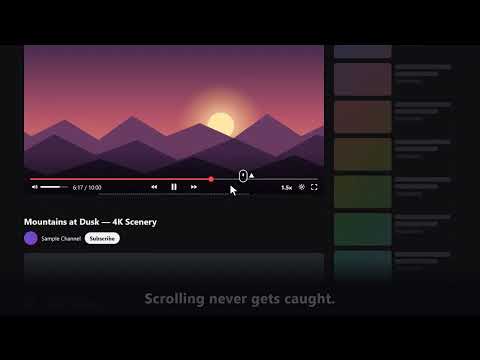
Seek, speed and volume by mouse wheel on the video's edge. YouTube, Netflix, Prime Video and more: 7 sites. Clicks go through.
Ghost Video Dial (formerly On the Sofa for YouTube) Seek, change the playback speed and set the volume, or move subtitle by subtitle, just by turning the mouse wheel on the edge of the video. * Moving by subtitle works with the subtitles shown by the subtitle feature of YouTube or Netflix (on YouTube, the subtitles you turn on and off with the CC button). On YouTube, it cannot move by subtitles that the uploader wrote into the video picture itself (on-screen text or burned-in subtitles). ■ Features - A transparent "ghost area" sits on the video: along the bottom edge for landscape videos (bottom left on YouTube), along the top edge for portrait ones (Shorts and the like). Shift + wheel moves it round six places on the video: top left, top, top right, bottom right, bottom and bottom left. - Clicks and drags go straight through to the site. The play button, the seek bar and all of the site's own controls work as usual. - It stays out of the way while you scroll the page. It works as a dial only once you move the pointer onto the ghost area, so scrolling with the wheel never gets caught on the video (the dashed line changes color while it is active). - On YouTube, Netflix and many of the other supported sites, it stays in sync with the site's own volume and speed display. - The playback speed and volume carry over to the next video. - A Subtitles slot moves subtitle by subtitle. While you turn it, the subtitle it will move to is shown, so you can quickly find a line you missed or the scene you want (YouTube and Netflix, with the subtitle feature on; not for subtitles written into the video picture). ■ Supported sites YouTube (videos and Shorts), Netflix, Prime Video and more: seven major video and social sites in all (the full list is in the extension's settings). It also works on other sites once you explicitly allow them, but it has not been tested on every site. ■ Bug reports and contact - GitHub: https://github.com/ogiharadevelopment/GhostVideoDial/issues (Posts are public. Please do not include your license key or any personal information.) - Email: ogiharadevelopment@gmail.com - X: https://x.com/OgiDevelopment ■ Free - 4 slots: ±1 s seek / ±5 s seek / speed (0.5x steps) / volume (5% steps) - The leftmost slot can be changed (a Subtitles slot too) - YouTube videos and Shorts can be turned on and off separately - The ghost area's position can be set per site ■ Pro (1-year license, no automatic renewal) - 600 JPY for one year (the final price, including any tax for your location, is shown at checkout) - 1 to 10 slots, with every slot's type and step size fully customizable - Slot set 2: set up a second set of slots, switched each time you briefly press Ctrl on the ghost area - Separate slot settings for each site - One license key works in up to 5 browsers - Sales and payment are handled by Lemon Squeezy (Merchant of Record); the extension and the license are provided by the developer (Google is not the seller). Enter the license key in the extension's settings. - Licenses bought for On the Sofa for YouTube (including lifetime licenses) keep working. ■ Entering your license key Enter the license key exactly as shown. Do not use machine translation (page translation can change the key). The key cannot be activated if it contains any extra characters. ■ Patents - Japanese Patent No. 7757577 - Japanese Patent Application No. 2025-133540 (divisional application, pending) - International patent application pending (PCT/JP2026/007877) These relate to the user interface of this extension. ■ Privacy and disclaimer - Your viewing history and the content of the pages you visit are never sent to the developer or any third party - Subtitles that the site's player loaded for display are used inside the browser only to show where you are moving to; they are never stored or sent - Settings and license information are stored in the browser's own storage - The only network traffic is to Lemon Squeezy, to activate and verify a Pro license (about once a day) - Privacy policy and terms of sale: https://ogiharadevelopment.github.io/GhostVideoDial/ghost-video-dial-policy.html - This extension is an independent tool and is not affiliated with, endorsed by or sponsored by any of the video services it works on
4.8 out of 55 ratings
Details
- Version2.1.0
- UpdatedOctober 19, 2026
- FeaturesOffers in-app purchases
- Offered byogiharadevelopment
- Size142KiB
- Languages8 languages
- Developer荻原功
中根2416-1 コーポ G&Y A 棟 202号室 ひたちなか市, 茨城県 312-0011 JPEmail
ogiharadevelopment@gmail.comPhone
+81 80-8461-4570 - TraderThis developer has identified itself as a trader per the definition from the European Union and committed to only offer products or services that comply with EU laws.
Privacy

Ghost Video Dial has disclosed the following information regarding the collection and usage of your data. More detailed information can be found in the developer's privacy policy.
Ghost Video Dial handles the following:
This developer declares that your data is
- Not being sold to third parties, outside of the approved use cases
- Not being used or transferred for purposes that are unrelated to the item's core functionality
- Not being used or transferred to determine creditworthiness or for lending purposes