

OmniBrief: AI Summarizer, Read-It-Later & Offline Search

Overview
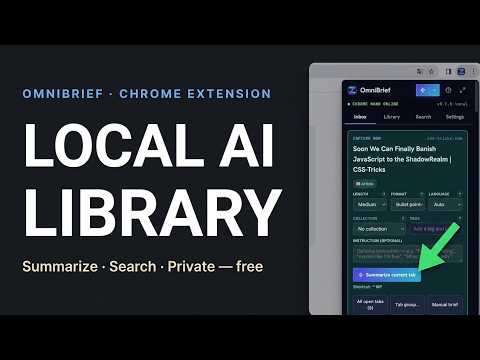
AI summarizer & read-it-later extension. Save pages, get instant on-device AI summaries, and search your library — private, offline.
OmniBrief: AI Summarizer, Read-It-Later & Offline Search OmniBrief is an AI summarizer and read-it-later extension for Chrome. Save any article, PDF, or web page to a private local queue, get an instant AI-generated summary, and find it again later with fast, offline semantic search — no cloud account, no subscription, nothing uploaded. Unlike traditional read-later apps that send your history, personal notes, and research documents to external cloud databases, OmniBrief processes and stores every single byte of data locally inside your browser. By combining Google Chrome's built-in native AI engine, WebAssembly vector embeddings, and the Origin Private File System (OPFS), OmniBrief provides a state-of-the-art research environment directly in your browser's side panel. No accounts are required, no subscriptions are charged, and zero telemetry data is collected. CORE CAPABILITIES OF OMNIBRIEF: 1. READ-IT-LATER INBOX & BACKGROUND QUEUE Add links, active tabs, or entire tab groups directly to your queue. OmniBrief opens a silent, isolated background tab, extracts the page text, captures a visual WebP screenshot, and extracts Open Graph images without blocking your current browsing session. Because it operates within your active browser instance, it successfully bypasses CORS issues, paywalls, and cookie-locked screens. 2. ON-DEVICE AI SUMMARIZATION Utilize the built-in AI power of your browser. OmniBrief accesses Chrome's native Gemini Nano engine to automatically summarize saved pages, generating a concise title, a one-line summary, key bullet points, and extracted keyword topics. If you run into hardware limits, you can easily configure fallback settings. 3. OFFLINE SEMANTIC VECTOR SEARCH Stop trying to recall exact keyword matches. OmniBrief includes an offline vector database. Using WebAssembly and ONNX runtime, the extension generates 384-dimensional vector embeddings for all titles, summaries, and keywords. You can query your library using abstract concepts (for example: "database scaling issues" or "privacy regulations"), and OmniBrief will rank your saved briefs by conceptual relevance. 4. END-TO-END DATA PRIVACY & OWNERSHIP Your reading habits are yours alone. All assets—metadata JSONs, markdown summaries, binary embeddings, and WebP previews—are stored in the browser's Origin Private File System (OPFS). You can export your entire research library as a standard ZIP file at any time, or import prior backups to migrate across machines. 5. SECURITY-FIRST API FALLBACKS If you choose to use cloud AI models (such as Claude, OpenAI, or Gemini Cloud) instead of the local Gemini Nano engine, your credentials remain secure. Using the browser's Web Crypto API, your API keys are encrypted client-side using PBKDF2 key derivation and AES-GCM 256-bit encryption with a custom PIN. Decrypted keys are held only in temporary browser memory and are wiped when the browser is closed. 6. DEVELOPER-FRIENDLY OLLAMA INTEGRATION For developers running models locally, OmniBrief offers native integration with Ollama and LM Studio. Simply route requests to your local endpoint to run summaries on larger, fine-tuned models like Llama 3 or Qwen without exposing internal documents to the public web. 7. READ ANY LANGUAGE, SUMMARIZED IN YOURS OmniBrief briefs a page in whatever language you choose — independent of the language the page itself is written in. Reading a Japanese, French, or German article? Get the brief in English, or any of 12 supported languages, right alongside it. The output language defaults to your browser's own language automatically, and can be overridden per-capture or as a global default in Settings. 8. RECIPES, VIDEOS & BREADCRUMBS — RENDERED, NOT RE-WRITTEN When a page publishes structured schema.org data, OmniBrief renders it directly instead of relying on the AI to reconstruct it. Recipe pages get a real Ingredients/Method tab strip with exact quantities and steps. Pages with a breadcrumb trail (Home > Section > Article) show it as a clickable path back into the site. Pages with an embedded video get a "Watch" button that plays inline when it's a direct video file, or opens the original video page when the source restricts embedding elsewhere. None of this costs extra AI tokens — it's read straight from the page's own metadata. HOW TO SET UP LOCAL AI SUMMARIZATION: To use Chrome's native AI summaries, ensure you are running Google Chrome (Version 138+) and have enabled the required flags: - Open chrome://flags/#optimization-guide-on-device-model and set it to "Enabled BypassPerfRequirement". - Open chrome://flags/#prompt-api-for-gemini-nano and set it to "Enabled". - Relaunch your browser and open OmniBrief to verify the download of the model component.
5 out of 51 rating
Details
- Version1.0.0
- UpdatedAugust 7, 2026
- Size6.38MiB
- LanguagesEnglish (United States)
- DeveloperWebsite
Email
support@zumilabs.com - Non-traderThis developer has not identified itself as a trader. For consumers in the European Union, please note that consumer rights do not apply to contracts between you and this developer.
Privacy

This developer declares that your data is
- Not being sold to third parties, outside of the approved use cases
- Not being used or transferred for purposes that are unrelated to the item's core functionality
- Not being used or transferred to determine creditworthiness or for lending purposes
Support
For help with questions, suggestions, or problems, please open this page on your desktop browser