

CF FetchCodes
9 ratings
)
Overview
Fetch Accepted Codes & AI Explainer for Codeforces with Dark Mode
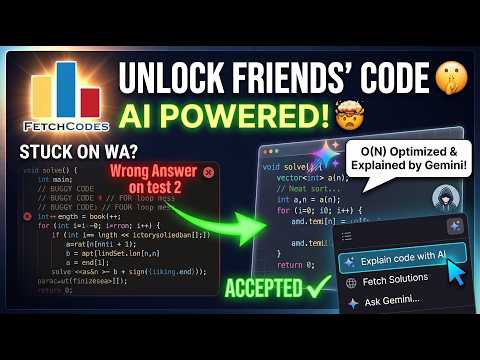
📊 CF FetchCodes: Learn from Friends' Solutions and AI Explanations Stuck on a Codeforces problem? Unlock the collective wisdom of your circle and the analytical power of AI! CF FetchCodes is a powerful browser extension designed to supercharge your Competitive Programming journey. It seamlessly integrates directly into the Codeforces problem page, allowing you to instantly view accepted solutions from your friends and get AI-powered explanations without ever leaving the tab. Whether you are looking for a different approach, an optimization hack, or a complete breakdown of complex logic, CF FetchCodes brings your friends' code and a personal AI tutor right to your screen. 🚀 What is New in the Latest Update 🚀 - Comprehensive Dark Mode: Say goodbye to eye strain! Enjoy a full-page dark mode for Codeforces problem pages and an isolated dark mode for code blocks with 6 selectable syntax themes (Monokai, Dracula, Nord, etc.). - Premium Animations: The UI now features buttery-smooth CSS animations when opening modals, expanding code blocks, and launching the AI chat. - Built-in AI Code Explainer: A Gemini-powered chat companion is now integrated right into the code view. Ask it to analyze approaches, explain time and space complexity, or answer specific follow-up questions about a friend's solution. (Note: Requires a free Gemini API key). - Right-Click Snippet Explain: Select any block of text or code on a Codeforces page, right-click, and select "Explain code with AI" for an instant, contextual breakdown. - 10x Faster Discovery: We implemented a new Two-Phase Discovery system using the contest standings API, making friend-checking virtually instant. - Modern UI and UX: Intrusive browser alerts are gone, replaced by sleek, non-intrusive Toast notifications. The new AI chat input auto-grows as you type for maximum comfort. - Optional Permission for AI: The permission dialog only appears at the natural moment when a user saves their API key. 🛡️Key Features:🛡️ - Instant Code Access: See a list of all friends who have accepted the current problem, auto-detected from your Codeforces friends list. - Personalize Your Setup: Toggle Dark Mode and choose your favorite code syntax theme directly from the extension popup. Your preferences are saved automatically. - Safety-First Architecture: Features human-like delays, smart batching, and randomized jitter to strictly adhere to Codeforces API limits and keep your account safe from rate-limiting. - Native Syntax Highlighting: Read code comfortably with coloring that matches the Codeforces environment. - Complete Privacy: All processing happens locally in your browser. Your Gemini API key is stored securely in your local storage and only communicates directly with Google's API. - Smart Caching and Lazy Loading: Code is only downloaded when you click a specific friend, and it caches in memory so re-opening the same code is instant. - Quick Navigation: Includes direct links to the original submission and your friend's profile. 🛠️ How to Use: 🛠️ 1. Install the Extension. 2. Add Friends: Go to any user's profile on Codeforces and click the Star button to add them to your friends list. 3. Setup AI (Optional but Recommended): Click the extension icon in your browser toolbar and paste your Gemini API key from Google AI Studio. 4. Open a Problem: Navigate to any Codeforces problem page. 5. Find the Widget: Look for the "Accepted Codes of Friends" box in the right sidebar. 6. Fetch and Read: Click "Show Codes", then click on any friend's name to expand and study their solution. 7. Ask AI: Click the "Explain" button above their code to open the chat explainer! ⚠️ Important Notes:⚠️ - Contest Integrity: To maintain fair play, this extension does not work during live contests. It is strictly designed for practice and upsolving. - Privacy Rules: You can only view submissions that are public. Private or gym submissions are restricted by Codeforces API rules. 🤝 Contribute and Support: CF FetchCodes is an open-source initiative built by the community, for the community. If you found a bug, have a feature request, or want to improve the codebase, you can find the project repository on GitHub at: github.com/sayanpaulcse/CF_FetchCodes Happy upsolving! 🚀 🚀 🚀
4.9 out of 59 ratings
Details
- Version26.7.27
- UpdatedJuly 29, 2026
- Offered bysayanpauldeveloper
- Size1.26MiB
- LanguagesEnglish
- Developer
Email
sayanpauldeveloper@gmail.com - Non-traderThis developer has not identified itself as a trader. For consumers in the European Union, please note that consumer rights do not apply to contracts between you and this developer.
Privacy

This developer declares that your data is
- Not being sold to third parties, outside of the approved use cases
- Not being used or transferred for purposes that are unrelated to the item's core functionality
- Not being used or transferred to determine creditworthiness or for lending purposes