


Overview
Every page in two languages: the translation sits beside each paragraph and the original never leaves. Tap a word for what it means.
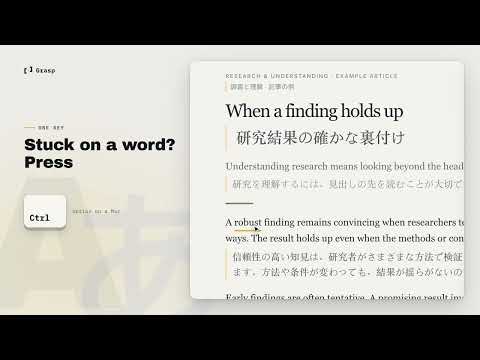
Every page, in two languages at once. Grasp translates the page you're reading and keeps the original in view. Read in your language, and glance at the source whenever a phrase matters. THE ORIGINAL NEVER LEAVES Each paragraph keeps its translation right below it. Headings, bylines, menus and buttons get theirs on the same line, so the page keeps its shape. TRANSLATED WITH THE PAGE AROUND IT Grasp's AI reads the page in order, with its title and the text before each passage. A sentence is translated as part of the article, not on its own. ON FOR THE WHOLE SITE Follow a link and the next page arrives translated. Switch between Parallel (both languages) and Translated (yours only) at any time, or turn translation off with one click. STILL UNCLEAR? TAP THE WORD Point at a word and tap ⌥ on a Mac or Ctrl on Windows. Grasp shows what it means in this sentence: the sense this writer meant, not a dictionary's first entry. DUAL SUBTITLES ON YOUTUBE Click the Grasp button in the YouTube player and every caption shows in two languages: the original line, with yours right under it. Grasp joins caption fragments into whole sentences and restores the punctuation that auto-generated captions lose. The full bilingual transcript opens beside the video. FREE TO TRY Translate two screens of any page and two minutes of any video, and look up three words, all without an account. NOTHING HAPPENS UNTIL YOU ASK Grasp reads nothing on a page until you ask. Pause it on any site from the toolbar.
0 out of 5No ratings
Details
- Version0.3.25
- UpdatedNovember 19, 2026
- FeaturesOffers in-app purchases
- Size270KiB
- Languages55 languages
- Developer
- Non-traderThis developer has not identified itself as a trader. For consumers in the European Union, please note that consumer rights do not apply to contracts between you and this developer.
Privacy

Grasp — Side-by-Side AI Page Translator has disclosed the following information regarding the collection and usage of your data. More detailed information can be found in the developer's privacy policy.
Grasp — Side-by-Side AI Page Translator handles the following:
This developer declares that your data is
- Not being sold to third parties, outside of the approved use cases
- Not being used or transferred for purposes that are unrelated to the item's core functionality
- Not being used or transferred to determine creditworthiness or for lending purposes