

Unified Privacy Guard
2 ratings
)
Overview
Unified privacy and visual blur protection across Facebook, WhatsApp, and Telegram.
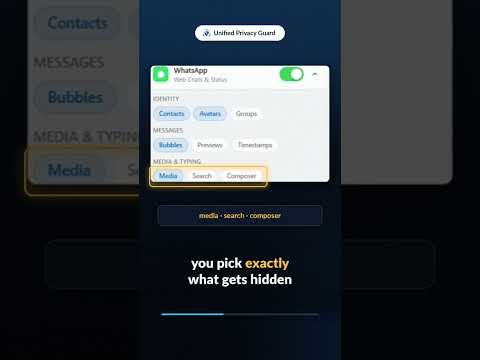
Unified Privacy Guard is a lightweight browser extension designed to help protect sensitive information on Facebook, WhatsApp Web, and Telegram Web. It adds an extra layer of visual privacy by masking names, profile pictures, usernames, messages, previews, media, timestamps, and other personal information on supported websites. This can help reduce accidental exposure when using your computer in public places, during screen sharing, presentations, livestreams, or while working around other people. ➤ Why Should You Choose Unified Privacy Guard? ➤ Global and Platform Controls Enable or disable privacy protection across all supported platforms with one master switch. Configure privacy settings separately for Facebook, WhatsApp Web, and Telegram Web. Use a keyboard shortcut to quickly enable or disable privacy protection. ➤ Selective Privacy Protection Choose which types of information you want to protect: * Contact and profile names * Usernames and @handles * Profile pictures and avatars * Group names and member information * Chat messages and comments * Message and conversation previews * Timestamps and activity information * Photos, videos, stories, reels, stickers, voice notes, and document previews * Text entered into supported search and message fields You can enable or disable each protection layer according to your needs. ➤ Smart Reveal Protected information can be temporarily revealed when you hover over or click on it. After the configured delay, the information is automatically protected again. ➤ Multiple Privacy Modes Choose the protection style that works best for you: * Standard blur * Heavy blur * Pixelation * Blackout redaction Blur intensity can also be adjusted to provide the level of protection you prefer. ➤ Additional Customization * Show a limited number of characters from message previews instead of completely hiding them. * Use predefined security presets such as Basic, Private, Maximum, or create your own Custom configuration. * Export and import your settings using a JSON configuration file. * Restore the extension to its default settings when needed. ➤ Privacy and Security Unified Privacy Guard is designed with privacy as a core principle. * All privacy protection and visual masking are performed locally in your browser. * The extension does not collect or transmit your messages, contacts, images, or browsing activity. * The extension does not use external analytics or telemetry services. * No personal information is sent to external servers for the privacy protection features. Unified Privacy Guard is designed to give users greater control over what is visible on their screen while using supported websites.
5 out of 52 ratings
Details
- Version1.0.0
- UpdatedSeptember 13, 2026
- Offered bySAKIB
- Size81.03KiB
- LanguagesEnglish
- Developer
Email
eftakharaminsakib@gmail.com - Non-traderThis developer has not identified itself as a trader. For consumers in the European Union, please note that consumer rights do not apply to contracts between you and this developer.
Privacy

This developer declares that your data is
- Not being sold to third parties, outside of the approved use cases
- Not being used or transferred for purposes that are unrelated to the item's core functionality
- Not being used or transferred to determine creditworthiness or for lending purposes