

Desk Tray Eisenhower Matrix

Overview
A productivity matrix to organize tasks by urgency and importance.
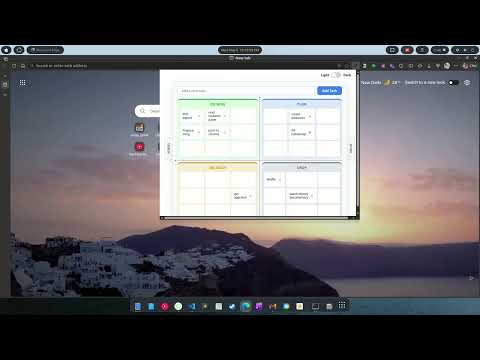
🚀 Organize Your Day with the Desk Tray Eisenhower Matrix Stop feeling overwhelmed by long to-do lists. The Desk Tray Eisenhower Matrix is a privacy-first, zero-friction task manager designed to help you organize your workload, prioritize effectively, and protect your focus. With our brand-new premium Glassmorphism design and lightning-fast keyboard workflows, managing your day has never looked or felt this good. ✨ WHAT'S NEW IN THIS VERSION: ⚡ Global Hotkey: Press Ctrl+E (or Cmd+E on Mac) from anywhere in your browser to instantly open and close your matrix. 🧠 Smart Tag Routing: Skip the drag-and-drop! Type shortcodes in your task to instantly send them to the right quadrant: - Type (iu) for Important & Urgent ➡️ Goes to Q1 (Do Now) - Type (inu) for Important & Not Urgent ➡️ Goes to Q2 (Plan) - Type (niu) for Not Important & Urgent ➡️ Goes to Q3 (Delegate) - Type (ninu) for Not Important & Not Urgent ➡️ Goes to Q4 (Drop) 🎨 Premium "Blob" UI: A completely redesigned, high-tech interface featuring frosted glass panels and animated, breathing gradient orbs. 🔍 Smart Truncation: Long tasks now truncate neatly to keep your grid perfectly aligned. Just hover over any task to read the full text! 🎯 HOW THE MATRIX WORKS: Divide your tasks into four specific quadrants based on Urgency and Importance: 🟩 Do Now (Urgent & Important): Tasks that need your immediate attention. Do these today. 🟦 Plan (Important, Not Urgent): Tasks that contribute to long-term goals. Schedule these. 🟨 Delegate (Urgent, Not Important): Tasks to automate or hand off. ⬛ Drop (Neither): Distractions. Delete these and protect your time. 🌟 KEY FEATURES: 📥 Sliding Inbox Tray: Quickly dump ideas into your inbox without interrupting your current focus, then sort them later. ✅ Sliding Done Tray: Drag completed tasks to the Done tray to keep your workspace clean while retaining a record of your wins. 🖱️ Intuitive Drag & Drop: Seamlessly move tasks between the inbox, quadrants, and done tray. 🌓 Auto-Theming: Rich, vibrant Dark and Light modes that match your system preferences. 🔒 100% Private: Everything runs offline. Your data is stored locally on your machine and never leaves your browser. Turn your "to-do" list into a "done" list today! 📈
0 out of 5No ratings
Details
- Version2.0
- UpdatedMay 11, 2026
- Offered byvermavinay982
- Size6.05MiB
- LanguagesEnglish
- Developer
Email
vermavinay982@gmail.com - Non-traderThis developer has not identified itself as a trader. For consumers in the European Union, please note that consumer rights do not apply to contracts between you and this developer.
Privacy

This developer declares that your data is
- Not being sold to third parties, outside of the approved use cases
- Not being used or transferred for purposes that are unrelated to the item's core functionality
- Not being used or transferred to determine creditworthiness or for lending purposes