

Clipler - Clipboard Cards: Copy Text & Images in One Click
2 ratings
)
Overview
Save frequently used text snippets and images as cards and copy them in one click. Great for canned replies, templates and forms.
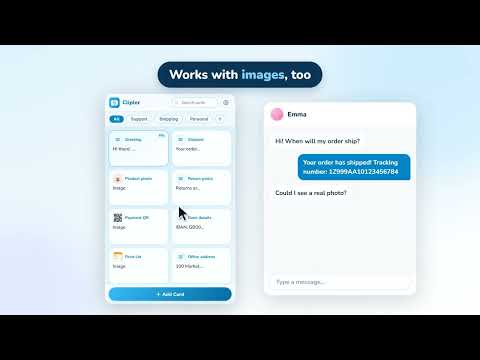
Tired of typing the same things over and over? Canned replies, shipping notices, bank details, addresses, email signatures… Save them as cards in Clipler — one click and they're on your clipboard. Copy images in one click, too Most clipboard tools only handle text. Clipler saves images as well — product photos, QR codes, price lists. Click a card and paste it straight into any chat. ━━━━━━━━━━━━━━━━ Who is Clipler for? ━━━━━━━━━━━━━━━━ • Customer support: answer common questions with one-click canned replies • Online sellers: shipping notices, payment info and product photos, ready to paste • Social media managers: hashtags, caption templates and logos • Sales & admin: company info, tax IDs, account details, email templates • Anyone who fills in forms: name, address and phone, without retyping ━━━━━━━━━━━━━━━━ Features ━━━━━━━━━━━━━━━━ • Click a card to copy its text or image instantly • Groups: keep work, personal and support replies apart, switch with one click • Search: find any card in seconds • Pin: keep your most-used cards at the top • Card titles: see what each card is at a glance • 6 color themes: Sky Blue, Sakura Pink, Mint Green, Lavender, Sunset Orange, Graphite • Standalone window: keep Clipler open beside your work • Keyboard shortcuts: Ctrl+Shift+Y to open, Ctrl+Shift+U for a separate window (Command on Mac) • Export / import backups: move to a new computer without losing anything ━━━━━━━━━━━━━━━━ Private and simple ━━━━━━━━━━━━━━━━ • Everything is stored on your own computer — nothing is uploaded to any server • No account or sign-up needed • Clipler never reads your clipboard; it only writes to it when you click a card • Available in English, 繁體中文 and 简体中文 ━━━━━━━━━━━━━━━━ Get started in 3 steps ━━━━━━━━━━━━━━━━ 1. Click the puzzle icon in the top-right of Chrome and pin Clipler to your toolbar 2. Open Clipler, add a card, and paste in text or an image you use often 3. Next time, just click the card and paste wherever you need it Enjoying Clipler? A quick rating helps a solo developer a lot — thank you! Questions or ideas? Email gaguyo0808@gmail.com
5 out of 52 ratings
Details
- Version1.0.6
- UpdatedNovember 8, 2026
- Offered byOvOcc
- Size54.37KiB
- Languages3 languages
- Developer
Email
gaguyo0808@gmail.com - Non-traderThis developer has not identified itself as a trader. For consumers in the European Union, please note that consumer rights do not apply to contracts between you and this developer.
Privacy

This developer declares that your data is
- Not being sold to third parties, outside of the approved use cases
- Not being used or transferred for purposes that are unrelated to the item's core functionality
- Not being used or transferred to determine creditworthiness or for lending purposes