

Navigator for Salesforce
10 ratings
)
Overview
Open any Salesforce Setup page, object, field, record, app or org in a few keystrokes.
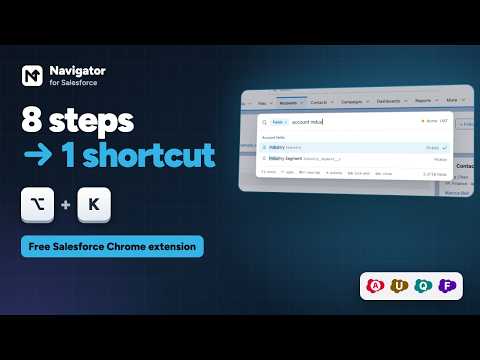
I built Navigator because I was tired of clicking through Setup to reach the same twenty pages every day. It puts a search box on top of Salesforce so you can get anywhere by typing a few letters. Press Alt+K (Option+K on a Mac) on any Salesforce page and start typing: - "users" opens Users, "perm" finds Permission Sets - "acme" finds the Acme account you looked at yesterday - "app service" opens the Service Console app - "fields account indus" takes you straight to the Industry field on Account - "new case", "list contacts" and "fields opportunity" do exactly what they say - "invoice" also finds your Apex classes and triggers, and custom metadata types, by name - "org uat" opens your UAT sandbox, and the right arrow opens the Setup page you're on there, to compare the two - "record" on any record page shows its field values, with API names, ready to copy - "login jane" logs you in as Jane (when you have permission to) Results are ranked by how well the name matches, so the page you meant comes first. The toolbar popup (Alt+N, or Option+N on a Mac) has four tabs: - Recent: Setup pages you opened and records you viewed - Navigate: Home, Setup, Object Manager, Dev Console, Flows, Users, change sets, plus up to 10 bookmarks - Objects: every object with one-click list, new record and fields, and a menu for layouts, record types, validation rules and triggers - Orgs: your saved orgs. Rename them, pin the ones you use most, open any of them in one click, or open the page you're on in another org A few more things it does: - Colors each saved org's browser tabs with a Salesforce cloud in that org's own color, with its initial, so production never looks like a sandbox (turn it on in Settings) - Adds a row of your own Setup quick tabs under the Setup header - Adds an N button to the Salesforce header that opens the popup - Home takes you to the current app's own start page, so apps without a Home tab stay tidy - Alt+S goes to Setup and Alt+A goes to Home (Option+S and Option+A on a Mac). You can change any shortcut at chrome://extensions/shortcuts - Light, dark or system theme - Everything can be switched on or off in Settings Privacy Navigator runs entirely in your browser. It talks only to the Salesforce org you are logged in to, using the session you already have, and it never sends your data anywhere else. There are no analytics, no ads and no accounts. Your bookmarks, orgs and settings sync through your own Chrome profile. Navigator is an independent project and is not affiliated with or endorsed by Salesforce, Inc. Questions or ideas: https://github.com/shawon39/navigator-for-salesforce/issues
5 out of 510 ratings
Details
- Version5.1.1
- UpdatedOctober 27, 2026
- Offered byShakhawat Hossain
- Size216KiB
- LanguagesEnglish
- Developer
Email
shshawon416@gmail.com - Non-traderThis developer has not identified itself as a trader. For consumers in the European Union, please note that consumer rights do not apply to contracts between you and this developer.
Privacy

This developer declares that your data is
- Not being sold to third parties, outside of the approved use cases
- Not being used or transferred for purposes that are unrelated to the item's core functionality
- Not being used or transferred to determine creditworthiness or for lending purposes
Support
For help with questions, suggestions, or problems, please open this page on your desktop browser