

GHL Funnel Cloner Pro
1 rating
)
Overview
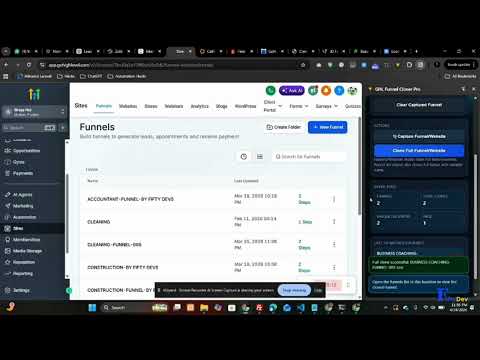
Clone GoHighLevel funnels and pages in one click, directly from your Chrome side panel. What it actually does? GHL Funnel Cloner…
Clone GoHighLevel funnels and pages in one click, directly from your Chrome side panel. What it actually does? GHL Funnel Cloner Pro is the fastest way for GoHighLevel agencies, funnel builders, and marketers to duplicate funnels across accounts and sub-accounts without rebuilding from scratch. If you manage multiple GoHighLevel (GHL) sub-accounts or LeadConnector locations, you already know how much time gets lost rebuilding the same funnel structure for every new client. Funnel Cloner Pro removes that repetitive work. It detects funnel and builder pages automatically as you browse GoHighLevel or LeadConnectorHQ, verifies your license, and gives you one-click access to clone, manage, and track every funnel you import — all from a lightweight browser side panel that stays out of your way. Why GoHighLevel Agencies Use Funnel Cloner Pro: Manually exporting and rebuilding funnels is slow, error-prone, and doesn't scale past a handful of clients. Agencies running 10, 50, or 100+ sub-accounts need a way to duplicate proven funnel structures quickly and consistently. Funnel Cloner Pro was built specifically for that workflow - no spreadsheets, no third-party automation tools, no manual copy-paste between accounts. Just open the page, detect the funnel, and clone. Key Features: - One-click funnel and page cloning directly from GoHighLevel and LeadConnectorHQ - Automatic detection of funnel builder pages as you browse , no manual setup per page - Native Chrome side panel , works alongside GoHighLevel without tab-switching or separate apps - Secure, license-based access with real-time verification status - Stats dashboard tracking total funnels cloned, recent activity, and locations used - Recent import history so you can quickly re-clone or reference past funnels - Compatible across *.gohighlevel.com, *.leadconnectorhq.com, and related GoHighLevel domains - Lightweight and fast , designed to run in the background without slowing down your builder pages Built For: - GoHighLevel agency owners managing multiple client accounts and sub-accounts - Funnel builders and marketers who template, resell, or repurpose funnels regularly - Freelancers and consultants delivering GHL setups for clients - SaaS resellers white-labeling GoHighLevel who need fast onboarding workflows - Anyone who needs to duplicate funnels across GoHighLevel accounts or locations on a regular basis How It Works: 1. Install GHL Funnel Cloner Pro from the Chrome Web Store 2. Open the side panel while browsing GoHighLevel or LeadConnectorHQ 3. Navigate to any funnel or builder page — the extension detects it automatically 4. Verify your license (one-time, fast verification) 5. Click to clone — the funnel is duplicated and ready to use in seconds 6. Check your stats dashboard and recent history anytime to track cloning activity Common Use Cases : - Duplicating a proven funnel template across new client sub-accounts - Cloning a high-converting funnel from one location to another within the same agency - Quickly spinning up a new GoHighLevel sub-account with existing funnel structures - Saving and reusing funnel builds across multiple GHL client accounts without manual rebuilding - Agencies standardizing onboarding by cloning a "starter funnel" into every new account Frequently Asked Questions 1. Does this work with LeadConnector as well as GoHighLevel? Yes. Funnel Cloner Pro is compatible with both *.gohighlevel.com and *.leadconnectorhq.com domains, since LeadConnectorHQ is the underlying platform GoHighLevel funnels run on. 2. Do I need a license to use this? Yes, Funnel Cloner Pro uses secure license-based access with real-time verification to ensure safe, authorized use. 3. Will this slow down my GoHighLevel builder pages? No. The extension is built to be lightweight and runs in the background, detecting funnel pages without adding noticeable load time. 4. Can I see my past cloning activity? Yes. The recent import history and stats dashboard let you track every funnel you've cloned, along with which locations they came from. 5. Is this an official GoHighLevel product? No. Funnel Cloner Pro is an independent browser extension built to work with GoHighLevel and LeadConnectorHQ pages, designed for agencies and marketers who use the GoHighLevel platform. 6. Why Browser-Native Beats Third-Party Tools? Many funnel duplication workarounds rely on external apps, Zapier/Make automations, or manual export-import cycles that introduce delays and points of failure. Funnel Cloner Pro works directly inside your browser, exactly where you're already working inside GoHighLevel , no extra logins, no external dashboards, no automation platform to maintain. It's built for speed and reliability first. Install Funnel Cloner Pro: If you work inside GoHighLevel every day, install GHL Funnel Cloner Pro and turn funnel duplication into a fast, reliable, browser-native workflow. Stop rebuilding the same funnel structures by hand , clone them in seconds and get back to growing your agency.
5 out of 51 rating
Details
- Version1.2
- UpdatedJune 21, 2026
- Offered byFiftyDevs
- Size19.48KiB
- LanguagesEnglish
- DeveloperMuhammad Sabir
Mohallah New Tariq Abad, St #6, WAPDA colony Multan 60000 PKEmail
sabirshahbzu@gmail.comPhone
+92 305 7301880 - TraderThis developer has identified itself as a trader per the definition from the European Union and committed to only offer products or services that comply with EU laws.
Privacy

GHL Funnel Cloner Pro has disclosed the following information regarding the collection and usage of your data. More detailed information can be found in the developer's privacy policy.
GHL Funnel Cloner Pro handles the following:
This developer declares that your data is
- Not being sold to third parties, outside of the approved use cases
- Not being used or transferred for purposes that are unrelated to the item's core functionality
- Not being used or transferred to determine creditworthiness or for lending purposes
Support
For help with questions, suggestions, or problems, please open this page on your desktop browser