


Overview
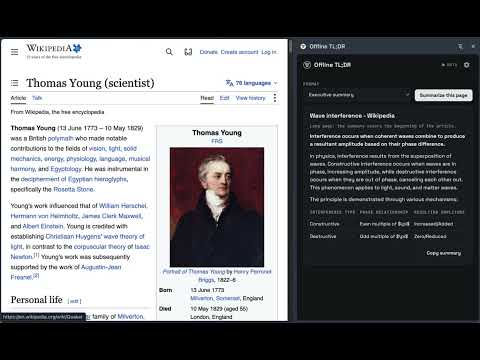
Summarize web pages entirely on your device. On-device models only (Chrome built-in, Ollama, LM Studio). No cloud, no telemetry.
Offline TL;DR summarizes the page you are reading using a model running on your own machine. Page text never leaves your device. No accounts, no cloud API, no telemetry. HOW IT WORKS Point the extension at a local inference server you already run - Ollama, LM Studio, a llama.cpp server, or any compatible endpoint on localhost. Open the side panel and click Summarize. The page is extracted, cleaned, and condensed locally. Once your model is pulled, it keeps working with no internet connection at all. WHAT YOU GET - Three formats: bullet points, a structured executive summary, or a one-liner TL;DR - A configurable length cap so summaries stay the size you want - Clean extraction that strips navigation, ads, sidebars, and footers before the model sees anything - Auto mode that summarizes each page as you browse, while the panel is open - Per-tab memory: every tab keeps its own summary, and a running summary finishes even if you close the panel - Live engine status: the panel tells you whether your runtime is up, and shows the exact command to start it when it is not - A model picker listing whatever models your local server is serving PRIVACY Offline TL;DR talks only to localhost. The manifest requests no remote hosts, so there is no code path that can send page content, prompts, or metadata anywhere. No analytics, no error reporting, no account, no sign-in. WHAT YOU NEED A local runtime on the same machine: - Ollama: https://ollama.com, default port 11434. Start it so it accepts extension origins: OLLAMA_ORIGINS="chrome-extension://*" ollama serve - LM Studio: https://lmstudio.ai, enable the local server, default port 1234 - llama.cpp: llama-server -m <model.gguf> --port 8080 Any recent instruct or chat model works. Smaller models are faster; larger ones summarize better. OPEN SOURCE MIT licensed. Source, issues, and roadmap: https://github.com/dkobia/offline-tldr
0 out of 5No ratings
Details
- Version0.4.0
- UpdatedSeptember 27, 2026
- Size97.46KiB
- LanguagesEnglish
- DeveloperWebsite
Email
david@kobia.net - Non-traderThis developer has not identified itself as a trader. For consumers in the European Union, please note that consumer rights do not apply to contracts between you and this developer.
Privacy

This developer declares that your data is
- Not being sold to third parties, outside of the approved use cases
- Not being used or transferred for purposes that are unrelated to the item's core functionality
- Not being used or transferred to determine creditworthiness or for lending purposes
Support
For help with questions, suggestions, or problems, visit the developer's support site