

OffLadder CV: Resume Tailor, ATS Check, Autofill & Job Tracker

Overview
Tailor your CV to the job you're viewing from what you've really done. ATS check, cover letter, autofill, job tracker. You submit.
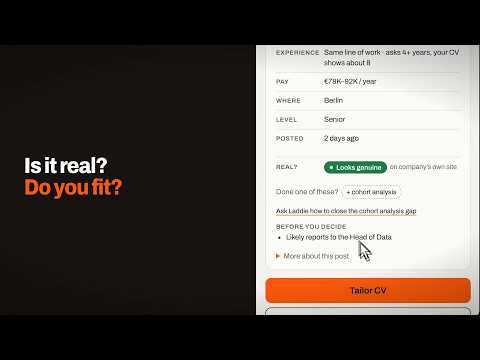
Tailor your CV to the job you're looking at, using only what you've really done. OffLadder CV sits in Chrome's side panel beside the job post: it shows which of the post's must-haves your CV already proves, rewrites your CV and cover letter in the post's words, fills the application for you to check, and keeps track of every job. You press submit. Free to try. Checking a job needs no account. WHY IT'S DIFFERENT • It reads the whole post, not just keywords: the real job title, the level, what the employer is looking for and its must-haves, quoted in the post's own lines. • It shows its working: each must-have sits next to the line of your CV that proves it, and the ones your CV doesn't show yet are marked. • It's fair to students and graduates: on an internship, graduate scheme or other entry-level role, missing experience in the field is never counted against you. • It never invents anything: no employer, title, tool or number that isn't already in your CV. CHECK A JOB AGAINST YOUR CV Open a job post, or paste one. Must-haves are matched to your CV, nice-to-haves are kept separate and not counted. Pay, location, date posted and the experience asked for show as quick facts when the post states them. Right to work, licences and shifts are left for you to answer. Save the job with a reminder, or set it aside. TAILOR YOUR CV AND COVER LETTER Your lines are rewritten in the post's words only where your experience backs them up. You see every change and can undo any of it. Paid work, internships, volunteering, society roles, virtual work programmes and projects each keep their own section, so a committee role never passes as a job. Pick a look, run the ATS checks and download a PDF or Word file. The cover letter is written from your CV for that job, in the same look. FIX WHAT IT READ FROM YOUR CV Every role, course and project is listed by its own title and dates. Open any one to correct it, say what kind of entry it is and choose the heading it prints under. Spot something wrong after tailoring? "Edit your CV" sits right next to the download buttons. FILL THE APPLICATION, YOU SUBMIT Fill puts in your details, attaches your CV and drafts answers to the open questions from your CV and the post. A draft goes into the form only when you press Put in form. Questions about work rights, visas, pay, gender, disability and consent are left to you. It never presses submit. Tested on 11 common application systems. Other forms differ, so it may fill only part of one, or none. TRY THE WORK BEFORE YOU APPLY Signed in, it can turn a post into a 15-minute task: one small piece of the real job, so you know whether you want more of it. WHO TO WRITE TO For a job you saved or applied to, it drafts a short note and a longer email, and Find names looks up to three people who likely lead the team, with a profile link and a work email where one is found. One free lookup, then part of membership. It won't always find a name or an email. YOUR JOBS, IN ONE PLACE Every job you checked, saved, tailored or applied to, what happened and when, reminders and closing dates, and every CV you downloaded, ready to download again. Export to CSV. Signed in, the same list is on your OffLadder account. ASK LADDIE Laddie, your OffLadder career coach, answers questions about the job or about any page you're reading. Your question is typed in for you and nothing is sent until you press Send. Mail, banking, sign-in, checkout and other private pages are never offered. WHAT IT COSTS • Checking jobs: free, no account. • Free OffLadder account: 3 CV tailorings a week. Having Fill draft a form's answers uses one of the 3. • Membership: $9 a month or $79 a year. Your first membership starts with 7 days free; you add a card at the start, get a reminder before the trial ends, and pay nothing if you cancel before day 7. Members tailor with no weekly limit (within a daily fair-use limit) and can use Find names on every saved job. • Payments are handled by Stripe on offladder.com. Full refund if you ask within 30 days of a payment. YOUR DATA Your CV and saved answers are stored in this browser, and you can delete them in Settings. Some features send data to OffLadder, which uses AI providers to process it: • Adding a CV: the CV text, or page images of a scanned CV, so it can be sorted into roles, skills and education. • Checking a job, when signed in: the job page's address, title and readable text (menus, headers, footers and cookie banners removed), so the post can be read in full. Not your CV. • Tailoring and cover letters: your CV details and the job text. • Drafting answers on a form: your CV details, the job text and the form's open questions. • Try the work: the job text, its must-haves, your role titles and skills. • Asking Laddie about a job: your question and a short note about the job (the role, its must-haves, what your CV shows and your gaps), not your contact details or CV text. • Asking Laddie about a page: the page's title, its address without the part after "?", and its opening lines or the part you selected, with your question, when you press Send. Phone numbers and email addresses are removed first. • Your jobs, when signed in with the setting on: the jobs you check, what you did with them, and the CVs and cover letters you download or copy. • Find names: the job's key. OffLadder looks up people at the employer through a business contact data provider. Nothing about you is sent. Conversations with Laddie are kept on your account. Once you put an answer into a form, that text is on the employer's site. Full details: https://offladder.com/privacy Works in Chrome on a computer. Questions or problems: hello@offladder.com
5 out of 52 ratings
Details
- Version2.5.1
- UpdatedNovember 18, 2026
- FeaturesOffers in-app purchases
- Size1.95MiB
- LanguagesEnglish
- DeveloperWebsite
Email
offladderhq@gmail.com - Non-traderThis developer has not identified itself as a trader. For consumers in the European Union, please note that consumer rights do not apply to contracts between you and this developer.
Privacy

OffLadder CV: Resume Tailor, ATS Check, Autofill & Job Tracker has disclosed the following information regarding the collection and usage of your data. More detailed information can be found in the developer's privacy policy.
OffLadder CV: Resume Tailor, ATS Check, Autofill & Job Tracker handles the following:
This developer declares that your data is
- Not being sold to third parties, outside of the approved use cases
- Not being used or transferred for purposes that are unrelated to the item's core functionality
- Not being used or transferred to determine creditworthiness or for lending purposes
Support
For help with questions, suggestions, or problems, visit the developer's support site