


Overview
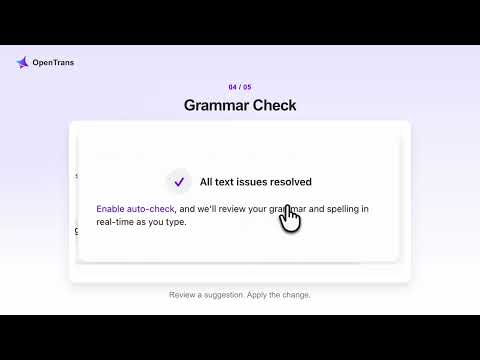
Webpage Translation, Input Box Translation, Select-to-Translate, AI Reply, Conversation Summary and Grammar Check.
📣 OpenTrans — Your Lightweight, All-in-One AI Reading & Writing Assistant Bilingual Web Translation · Triple-Space Input Translation · Selection Lookup · AI Email Reply · Thread Summary · Grammar Check Say goodbye to expensive monthly subscriptions! OpenTrans helps you handle daily foreign-language reading and cross-border communication in the lightest way possible: ✅ Zero Friction: No sign-up or login required—install and start with free daily cloud credits ✅ Geek-Friendly Freedom: Supports Chrome’s built-in Local AI (free forever) and Bring Your Own API Key (BYOK) ✅ Transparent Pay-As-You-Go: Cloud credits never expire. Pay only for what you use—no recurring fees, ever --- ✨ Core Features ⌨️ Web Input Box Translation - Triple-Space to Translate: Write in your native language inside any supported web input box, press the Spacebar three times, and watch it transform in place into natural, idiomatic target text - Context-Aware: When enabled on supported email and chat platforms, the AI reads your conversation context to make translations fit the tone and scenario 📰 Webpage & Google Docs Translation - Bilingual / Translation-Only Toggle: Read long-form articles, technical docs, and global news effortlessly without breaking the original page layout - Google Docs Translation: Translate Google Docs content in place and switch between the original and the translation anytime - Auto-translate Sites: Add the sites you visit often and they open in bilingual mode automatically, without clicking the floating ball each time. 🔍 Selection Translation & Lookup - Word Deep-Dive: Select any word to instantly view phonetic pronunciation, core definitions, bilingual examples, and contextual meaning - Instant Paragraph Translation: Highlight any sentence or paragraph to view the translation in a clean inline pop-up 💬 AI Smart Reply & Thread Summary - Draft from a Quick Thought: Jot down a brief idea in your own language inside an email or chat box, click Generate to craft a polished reply, review it, and insert with one click - Long Thread Summary: Facing lengthy email chains or busy group chats? Summarize the key takeaways in one click before replying ✍️ Real-Time Grammar & Spelling Check - Automatically detects spelling and grammar issues next to supported input boxes—review suggestions item by item and apply fixes with a single click --- ⚙️ Flexible AI Models & Pricing (3 Ways to Use) 1. Official Cloud Service (Ready Out of the Box): • Enjoy free daily trial uses without logging in; sign in to claim 20,000 bonus credits and unlock models across OpenAI, Claude, Qwen, and more. • Cloud credits never expire—pay strictly for what you use with zero subscriptions. 2. Free Models (100% Free): • Browser Local AI: Run Chrome’s built-in on-device models (requires Chrome 148+ and supported hardware; first use downloads the model). No login needed. • Free Machine Translation: Built-in Microsoft / Google translation for webpage, input box and select-to-translate. No API key needed. 3. Bring Your Own API Key / BYOK (Zero Markup): • Connect your own third-party API keys to use your existing quota directly without spending OpenTrans credits. --- 🚀 30-Second Quick Start 1. Install OpenTrans and pick your target language in the extension panel. 2. No login needed—open any foreign webpage to try bilingual translation, or type in your native language in a web input box and press Space three times. 3. Loving it? Sign in anytime to claim 20,000 free credits and unlock more flagship models. --- ❓ Frequently Asked Questions 📌 Can I use it without creating an account? Yes. It works right out of the box—you get free daily cloud uses and unlimited access to Browser Local AI without logging in. Signing in unlocks an extra 20,000 bonus credits and additional cloud models. 📌 What is free and what is paid? - Browser Local AI: Free forever—no login and no credits deducted. - Bring Your Own API Key (BYOK): Uses your own provider quota—no OpenTrans credits deducted. - Official Cloud Service: Free daily quota included; if you need more, top up on a pay-as-you-go basis. Credits never expire and there are no monthly or annual fees. 📌 Is my text data private and secure? When using Local AI, supported tasks run completely on your device without sending text to the cloud. When using Official Cloud or BYOK, only the text you actively process. --- 📧 Support & Feedback: support@getopentrans.com 📖 Documentation: https://www.getopentrans.com/docs
5 out of 55 ratings
Details
- Version1.13.0
- UpdatedNovember 23, 2026
- Size2.57MiB
- Languages21 languages
- DeveloperWebsite
Email
support@getopentrans.com - Non-traderThis developer has not identified itself as a trader. For consumers in the European Union, please note that consumer rights do not apply to contracts between you and this developer.
Privacy

OpenTrans: AI Translate & Write has disclosed the following information regarding the collection and usage of your data. More detailed information can be found in the developer's privacy policy.
OpenTrans: AI Translate & Write handles the following:
This developer declares that your data is
- Not being sold to third parties, outside of the approved use cases
- Not being used or transferred for purposes that are unrelated to the item's core functionality
- Not being used or transferred to determine creditworthiness or for lending purposes
Support
For help with questions, suggestions, or problems, visit the developer's support site