

Synced Pins - Zen Essentials in Chrome

Overview
Shows the same pinned tabs in every window. Each pin lives in one window; selecting it in another window brings the live page there.
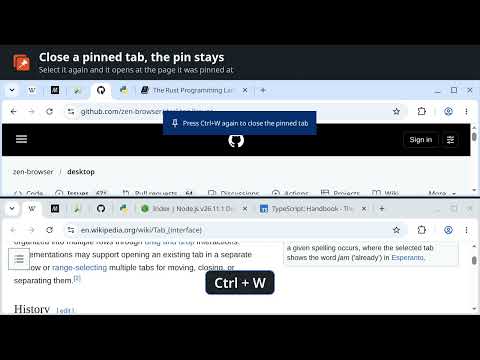
Every window gets the same pinned tabs, like Essentials in the Zen browser. Each pinned tab is open in one window. Your other windows show it in the same place, with its icon, and selecting it there brings the page over as it is: nothing reloads, a video keeps playing, a half-typed message stays. Switching to a window that shows a pinned tab brings the page back there too. A window showing one of its own tabs takes nothing, so a pinned tab can keep running in one window while you work in another. Pin, unpin or reorder a pinned tab in any window and every window follows. Closing a pinned tab closes its page, but the pin stays: select it again and it opens at the address it was pinned at. Unpin it to remove it. Close the window a pinned tab is open in and it opens again in the window you used last. Popups, installed web apps and incognito windows are left alone. Nothing is collected or sent anywhere. Source: https://github.com/nanbiz/synced-pins
0 out of 5No ratings
Details
- Version1.0.9
- UpdatedOctober 12, 2026
- Offered bynanea.biznes
- Size23.16KiB
- LanguagesEnglish
- Developer
Email
nanea.biznes@gmail.com - Non-traderThis developer has not identified itself as a trader. For consumers in the European Union, please note that consumer rights do not apply to contracts between you and this developer.
Privacy

This developer declares that your data is
- Not being sold to third parties, outside of the approved use cases
- Not being used or transferred for purposes that are unrelated to the item's core functionality
- Not being used or transferred to determine creditworthiness or for lending purposes
Support
For help with questions, suggestions, or problems, visit the developer's support site