


Overview
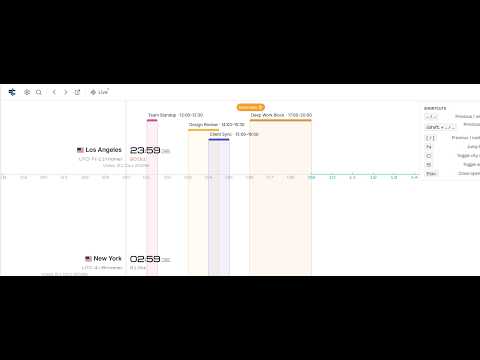
A world clock that shows your calendar events and schedule across multiple time zones, on timelines of your cities.
Perfect Clock shows your calendar events on world clock timelines of your cities, so you can see your whole schedule across multiple time zones at a glance. Every meeting lines up with the local time in all your cities – no mental time zone math. Google Calendar is supported today, with more calendar sources on the way. It works right in Chrome's side panel. 🚀 Quick Start 1. Click "Add to Chrome" 2. Click the Perfect Clock icon – the world clock opens in the side panel 3. Add your cities 4. Connect your calendar in Settings and see your events across all time zones ✨ 10 reasons to choose Perfect Clock 1️⃣ Your calendar events and schedule shown in every time zone you need 2️⃣ See what local time each meeting falls on in all your cities – at a glance 3️⃣ Working hours highlighted in your cities – spot meetings outside someone's workday 4️⃣ Browser notifications the moment an event starts 5️⃣ Timelines of all your cities lined up together – drag to scrub through the day 6️⃣ Lives in Chrome's side panel next to your email, docs or video call 7️⃣ Pop out into a full-width tab with one click 8️⃣ Keyboard shortcuts: jump by day, week or to the next event 9️⃣ 12h / 24h time and 6 date formats 🔟 Private by design: no sign-up, no ads, calendar events never stored 📅 Your Calendar Across Time Zones ➤ Connect Google Calendar in one click and see your calendar events laid out on the timelines of your cities. ➤ Every event lines up with the clocks of all your cities – instantly see that a 10 AM call in New York is 3 PM in London. ➤ Jump between events with [ and ] keys and get a notification when the next one starts. 🌍 Schedule Meetings with Remote Teams ➤ Working with a distributed team or clients abroad? Add their cities and drag the timelines to find a time that works for everyone. ➤ Working-hours highlighting shows where the overlap is, so you stop waking people up with late-night calls. ➤ Choose a home city, and all event times are shown relative to it. ⏱️ Always at Hand ➤ The side panel stays open while you browse, so your schedule and time zones are always one glance away. ➤ Need a bigger view? Open Perfect Clock in its own tab for a full-width view. ➤ Prefer the web? The same app works at perfectclock.cc. ⌨️ Fast Navigation ➤ ← / → – previous / next day ➤ Shift + ← / → – previous / next week ➤ [ / ] – previous / next event ➤ N – jump to now, C – city search, S – settings ❓ Frequently Asked Questions 📌 Is Perfect Clock free? 💡 Yes. Add up to 3 cities, connect your calendar and get event notifications – all for free. 📌 Which calendars are supported? 💡 Google Calendar today. Support for more calendar sources is in the works. 📌 Which cities can I add? 💡 Pick from a curated list of capitals and major cities, or search for any place in the world. 📌 Does it handle daylight saving time and timezone changes? 💡 Yes, time zones and DST changes are taken into account automatically. 📌 What does it do with my Google Calendar? 💡 Read-only access to your primary calendar, only after you click "Connect Google Calendar". The same Perfect Clock account works on the website and in the extension: connect once, and the extension signs in without asking again. Events are shown, never stored. 📌 Is my data private? 💡 Yes. Your cities, settings and your own events are stored locally in your browser. An account exists only if you connect Google Calendar, and you can delete it in Settings. No ads. The extension sends only anonymous feature-usage statistics — never your calendar or anything you type. 📌 When do notifications arrive? 💡 When an event starts, while the timeline is showing the current time. 💬 Found a bug or have an idea? https://github.com/alexeipanov/perfectclock-support/issues 🌐 Web version with public calendars – shortwave broadcasts, amateur radio contests, night-sky events and more: ➤ Shortwave & radio: https://perfectclock.cc/shortwave ➤ Amateur radio: https://perfectclock.cc/ham-radio ➤ Astronomy: https://perfectclock.cc/astronomy
0 out of 5No ratings
Details
- Version1.1.5
- UpdatedOctober 23, 2026
- Size1.47MiB
- LanguagesEnglish
- DeveloperWebsite
Email
a8panov@gmail.com - Non-traderThis developer has not identified itself as a trader. For consumers in the European Union, please note that consumer rights do not apply to contracts between you and this developer.
Privacy

Perfect Clock has disclosed the following information regarding the collection and usage of your data. More detailed information can be found in the developer's privacy policy.
Perfect Clock handles the following:
This developer declares that your data is
- Not being sold to third parties, outside of the approved use cases
- Not being used or transferred for purposes that are unrelated to the item's core functionality
- Not being used or transferred to determine creditworthiness or for lending purposes
Support
For help with questions, suggestions, or problems, visit the developer's support site