


Overview
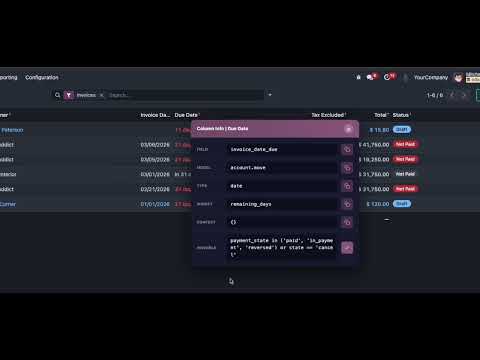
Developer toolkit for Odoo: copy field button column info. Export field info. Build domain, and compare record. Supports Odoo 10-19.
OdooSnip — Developer Tools for Odoo OdooSnip is a lightweight, high-utility browser extension designed specifically for Odoo developers, consultants, and power users. It eliminates the daily friction of manually transcribing technical metadata from the Odoo interface, allowing you to focus on building rather than typing. What OdooSnip Does OdooSnip enhances the native Odoo "Developer Mode" by adding powerful tools directly into your workflow: Smart Copy Buttons: Injects a dedicated copy icon next to every field, button, and column tooltip — including Field Name, Model, Type, Relation, Domain, and Context. Click to instantly save any value to your clipboard. No more struggling to highlight text that disappears when you move your mouse. Export Fields: Export all technical field metadata from any form or list view to CSV or JSON with a single click. Perfect for documentation, audits, or sharing specifications with your team. Domain Builder: Visually construct Odoo domains with an intuitive interface. Select fields from the current view with autocomplete, choose translated operators, set values, and combine conditions with AND/OR logic. Copy the generated domain string ready to paste into your code. Record Comparison: Compare field values between two records side by side. Capture any record, navigate to another, and instantly see what changed — ideal for debugging, QA testing, or tracking configuration differences. Copy History: Every value you copy is automatically saved with context (field name, model, timestamp). Search, filter, and re-copy any previous value without navigating back to the original record. Key Features: Works with Odoo versions 10 through 19 Multi-language support (adapts to your Odoo instance language) Clean, dark-themed UI that feels native to the Odoo ecosystem Visual confirmation on every action No account required — works instantly after installation
5 out of 57 ratings
Details
- Version3.0.3
- UpdatedMay 4, 2026
- Size2.38MiB
- LanguagesEnglish
- Developer
- Non-traderThis developer has not identified itself as a trader. For consumers in the European Union, please note that consumer rights do not apply to contracts between you and this developer.
Privacy

This developer declares that your data is
- Not being sold to third parties, outside of the approved use cases
- Not being used or transferred for purposes that are unrelated to the item's core functionality
- Not being used or transferred to determine creditworthiness or for lending purposes