


Overview
Turns your new tab page into a tab manager: save a whole window into a folder, tab groups and all, and reopen it in one click.
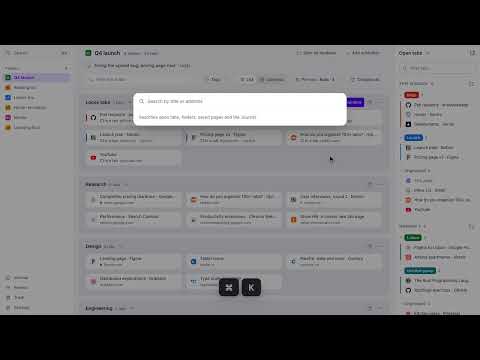
Clear your tabs. Keep them all. Octab turns Chrome's new tab page into a tab manager and session saver. Put a window away in a folder before you close it, and one click brings every tab back, in its groups. Free to use. You sign in with an Octab account, so your folders are kept on Octab's server and are there on every computer you sign in on. SAVE A WINDOW, CLOSE IT • Save the window you're in, or every open window at once, into a folder. • Chrome tab groups are kept: their names, colors and order. • Right-click any page, or use the side panel, to save a single tab. • Folders can hold subfolders, so a project can keep its research, design and bugs apart. OPEN IT AGAIN IN ONE CLICK • Open a whole folder, or just one of its subfolders, in the window you're in or in a new one. • Leave yourself a one-line note on each folder: what you were doing and what's next. • Saved websites already open in a tab are marked; a click switches to that tab instead of opening a copy. FIND ANY TAB IN A SECOND • On the new tab page, press ⌘K (Ctrl+K on Windows and Linux) to search your open tabs, saved websites, folders and the Journal at once. • Or type “octab” and a space in the address bar to search your folders and saved websites from any page. THE JOURNAL: TABS YOU CLOSED • Tabs you close are kept in the Journal for 90 days, listed by day. • A window you closed by accident comes back, every tab, from one row. • The Journal stays in this browser and is never synced. Incognito windows are never recorded. You can turn it off or clear it in Settings. LESS CLUTTER, IF YOU WANT IT • Tabs you leave alone for 7, 14 or 30 days can close into the Journal. Octab asks before the first time. • Review shows saved websites you haven't opened in a while, so you can keep them or let them go. Light and dark, following your computer's setting. ALREADY USING OCTAB? New installs get the Octab shown here. If you already use Octab, nothing changes unless you want it to. Your home page, notes, tasks and folders are all still there. You can try the new Octab from Settings, and switch back at any time. Questions or ideas: hello@octab.app
4.2 out of 520 ratings
Details
- Version2.0.0
- UpdatedNovember 4, 2026
- Size7.51MiB
- LanguagesEnglish
- DeveloperWebsite
Email
hello@octab.app - Non-traderThis developer has not identified itself as a trader. For consumers in the European Union, please note that consumer rights do not apply to contracts between you and this developer.
Privacy

Octab: Smart Tab Manager has disclosed the following information regarding the collection and usage of your data. More detailed information can be found in the developer's privacy policy.
Octab: Smart Tab Manager handles the following:
This developer declares that your data is
- Not being sold to third parties, outside of the approved use cases
- Not being used or transferred for purposes that are unrelated to the item's core functionality
- Not being used or transferred to determine creditworthiness or for lending purposes