

OCR Translator
54 lượt xếp hạng
)
Tổng quan
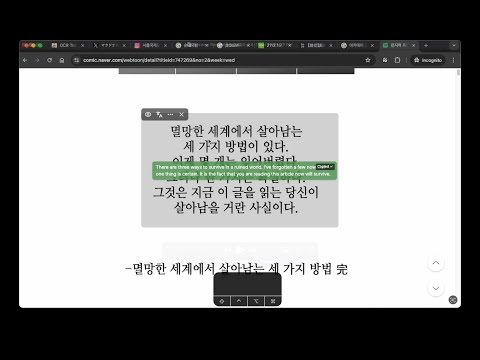
Capture, crop, and instantly translate any on-screen text, including images, with just one click.
[Supports] - English - Chinese / 中文 - Japanese / 日本語 - Korean / 한국어 - Russian / Русский - French / Français - German / Deutsch - Thai / ภาษาไทย (unstable) - Hindi / हिन्दी - Turkish / Türkçe - Polish / polski Take screenshots and get translation right away! With our innovative OCR Translator Chrome Extension, you can capture any part of your screen—even if it's just an image—and instantly receive a translated overlay. Unlike other tools that only work with selectable text, our extension uses advanced OCR technology to extract text directly from images, making it perfect for those hard-to-reach areas like YouTube videos, Google Maps photo reviews or foreign language Instagram posts. ⭐️ Key Features: 1️⃣ Instant Capture & Crop: Quickly take screenshots and crop the exact area you want translated. 2️⃣ Advanced OCR Technology: Extract and translate text from images, not just digital text. 3️⃣ User-Friendly Translation Overlay: See translations appear directly over your original content for a smooth browsing experience. ✅ Perfect for Unselectable Text: Ideal for scenarios where text is embedded in images or rendered in non-selectable formats. ✅ User-Friendly & Efficient: Designed for simplicity and speed, ensuring you get the information you need without any hassle. [Updates] [v1.6] - Support SSO login - UI improvements [v1.5] - Massive UI refactorization - Fix 5 reported bugs related to UI. [v1.4] - Massive refactorization - Add notice feature in settings page - [.1] minor bug fixes - [.2] Support Vietnamese (unstable) and Portuguese - [.3] bug fix: sometimes the selection does not work - [.4] security: narrow down the permission scope [v1.3] - Add config page that could customize shortcut - Support Turkish - [.1] Support Polish - [.2] Add rate limit feature [v1.2] - fix a few know bugs - add slider ui for copying the detected text - [.1] fix failover logics for exception cases - [.2] now persistantly saves text size and background opacity. - [.3] change backend endpoint for server relocation [v1.1] - Now you can select a image to translate just by clicking. (not dragging) - Support two more languages, Thai and Hindi - [.1] improve image parsing accuracy - [.1] improve translation quality - [.2] support parsing image displayed by canvas element
4,4/554 lượt xếp hạng
Chi tiết
- Phiên bản1.6.0
- Đã cập nhật15 tháng 6, 2026
- Tính năngCung cấp tính năng mua trong ứng dụng
- Nhà cung cấpiwanhae
- Kích thước1.12MiB
- Ngôn ngữEnglish
- Nhà phát triển
Email
iwanhae@gmail.com - Người bán phi thương mạiNhà phát triển này không tự nhận mình là người bán. Đối với người tiêu dùng ở Liên minh Châu Âu, xin lưu ý rằng các quyền của người tiêu dùng không được áp dụng trong hợp đồng giữa bạn và nhà phát triển này.
Quyền riêng tư

OCR Translator đã công bố thông tin sau đây liên quan đến việc thu thập và sử dụng dữ liệu của bạn. Bạn có thể xem thêm thông tin chi tiết trong privacy policy của nhà phát triển.
OCR Translator xử lý dữ liệu sau:
Nhà phát triển này tuyên bố rằng dữ liệu của bạn
- Không được bán cho bên thứ ba, ngoài những trường hợp sử dụng đã được phê duyệt
- Không được sử dụng hoặc chuyển nhượng cho các mục đích không liên quan đến chức năng chính của mặt hàng
- Không được sử dụng hoặc chuyển nhượng để xác định khả năng thanh toán nợ hoặc phục vụ mục đích cho vay
Hỗ trợ
Nếu bạn có câu hỏi, ý kiến đề xuất hoặc gặp vấn đề, vui lòng mở trang này bằng trình duyệt dành cho máy tính để được trợ giúp