Item logo image for OCI Config Capture

OCI Config Capture

Item media 4 (screenshot) for OCI Config Capture
Item video thumbnail
Item media 2 (screenshot) for OCI Config Capture
Item media 3 (screenshot) for OCI Config Capture
Item media 4 (screenshot) for OCI Config Capture
Item video thumbnail
Item media 2 (screenshot) for OCI Config Capture
Item media 3 (screenshot) for OCI Config Capture
Item media 4 (screenshot) for OCI Config Capture

Overview

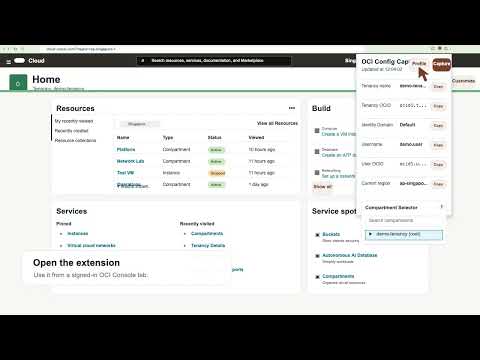
Displays tenancy, user, region, and compartments from the active OCI Console session.

OCI Config Capture is a lightweight Chrome extension that captures key details from the currently active Oracle Cloud Infrastructure (OCI) Console session and displays them in a compact popup. The extension helps cloud architects, engineers, developers, and administrators quickly extract OCI Console configuration details for OCI CLI, SDKs, automation, scripts, support, or documentation. In the default OCI Console, users must manually navigate multiple pages to collect tenancy OCID, user OCID, region, identity domain, compartments, API key fingerprint, and related profile values. With one Capture click, the extension reads the active OCI Console session and displays key values in a compact popup with copy buttons. It also provides a compartment selector and an SDK/CLI Profile generator, allowing users to build a config profile with tenancy, user, region, fingerprint, and private key path. This reduces manual work, avoids copy mistakes with long OCIDs, and speeds up setup for CLI/SDK usage while keeping the process local in the browser.

Details

  • Version
    0.1.0
  • Updated
    May 18, 2026
  • Size
    38.64KiB
  • Languages
    English (United States)
  • Developer
    Email
    jahangir2526@gmail.com
  • Non-trader
    This developer has not identified itself as a trader. For consumers in the European Union, please note that consumer rights do not apply to contracts between you and this developer.

Privacy

Manage extensions and learn how they're being used in your organization

OCI Config Capture has disclosed the following information regarding the collection and usage of your data. More detailed information can be found in the developer's privacy policy.

OCI Config Capture handles the following:

Web history

This developer declares that your data is

  • Not being sold to third parties, outside of the approved use cases
  • Not being used or transferred for purposes that are unrelated to the item's core functionality
  • Not being used or transferred to determine creditworthiness or for lending purposes

Related

Claude Code Browser Control

0.0

Allows Claude Code to interact with your active browser tab via a local MCP server.

SniCap: Web Screenshot Capture

0.0

Capture elements, visible areas, and full pages from any website.

Claude Counter

5.0

Shows ~token count, cache timer, and native session/weekly usage bars on claude.ai.

Claude Limit Guard

5.0

Shows Claude session and weekly usage limits inside the Claude interface. No third-party network, storage, or page injection.

Corbado Observe Debugger

0.0

Debug Corbado Observe integrations in Chrome DevTools. Inspect sessions, user references, event batches, and lows.

CloudWatch Synthetics Recorder

3.9

Record user actions and generate CloudWatch Synthetics Canary scripts.

ClaudeTrack - Claude Token Counter

5.0

Displays Claude session and weekly usage limits, active model, and message count directly on claude.ai.

Freezeframe

0.0

Instantly freeze active window sessions, clear system memory, and organize tabs into named local capsules.

Token Counter

0.0

Real-time token usage tracker for AI assistants — session quota, weekly quota, context window, and cache timer.

Session Activity Helper

0.0

User-controlled in-browser activity simulation for keeping your own web sessions awake.

CloudRadar — AWS · GCP · Azure Monitor

0.0

Monitor AWS, GCP, and Azure region status in real time, grouped by continent. 72 regions covered.

OdooClaw Browser Copilot

0.0

Pair and share active tab context with OdooClaw Browser Copilot backend.

Claude Code Browser Control

0.0

Allows Claude Code to interact with your active browser tab via a local MCP server.

SniCap: Web Screenshot Capture

0.0

Capture elements, visible areas, and full pages from any website.

Claude Counter

5.0

Shows ~token count, cache timer, and native session/weekly usage bars on claude.ai.

Claude Limit Guard

5.0

Shows Claude session and weekly usage limits inside the Claude interface. No third-party network, storage, or page injection.

Corbado Observe Debugger

0.0

Debug Corbado Observe integrations in Chrome DevTools. Inspect sessions, user references, event batches, and lows.

CloudWatch Synthetics Recorder

3.9

Record user actions and generate CloudWatch Synthetics Canary scripts.

ClaudeTrack - Claude Token Counter

5.0

Displays Claude session and weekly usage limits, active model, and message count directly on claude.ai.

Freezeframe

0.0

Instantly freeze active window sessions, clear system memory, and organize tabs into named local capsules.

Google apps