


Overview
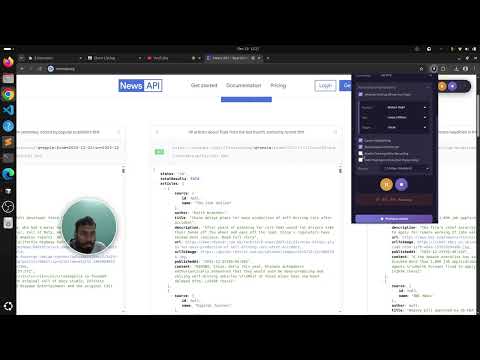
Professional screen recorder & screenshot tool. Record screen with webcam overlay, capture full page screenshots, and more!
RecordIt Neo - Professional Screen Recording & Screenshot Tool Transform your screen recording and screenshot experience with RecordIt Neo, the ultimate Chrome extension for content creators, educators, developers, and professionals. 🎬 POWERFUL SCREEN RECORDING • Record your entire screen, application window, or specific browser tab • Blur any element on web pages when record websites • Crystal-clear recordings up to 4K resolution (2160p) with Premium • Smooth 60 FPS recording for professional-quality videos • Webcam overlay (Show Your Face) with customizable position, size, and shape • Dual audio recording: system audio and microphone • Unlimited recording length with Premium subscription • 3-2-1 countdown before recording starts • Floating controls visible across all tabs during recording 📸 ADVANCED SCREENSHOT CAPTURE • Capture visible area instantly • Select specific regions with precision • Full-page screenshots for long content • Built-in screenshot editor with annotation tools • Multiple export formats (PNG, JPG, WebP) • One-click copy to clipboard ✨ PREMIUM FEATURES Upgrade to unlock professional capabilities: • 4K Recording (2160p) - Ultra HD quality • QHD Recording (1440p) - Professional quality • 60 FPS Recording - Buttery smooth playback • Unlimited Recording Length - No time restrictions • Priority Support - Get help when you need it 🎨 WEBCAM OVERLAY OPTIONS • Shape: Circle or Square • Size: Small, Medium, or Large • Position: 6 customizable positions (corners, sides) • Professional picture-in-picture effect • Toggle on/off anytime 🎛️ RECORDING CONTROLS • Floating controls that follow you across tabs • Option to hide controls for cleaner recordings • Always-accessible popup controls • Pause and resume during recording • Real-time recording timer ⚙️ ADVANCED CUSTOMIZATION • Quality Presets: Low, Medium, High, Ultra • Custom Bitrate Control: 2.5 Mbps to 20 Mbps • Frame Rate Selection: 15, 30, 60 FPS • Export Formats: WebM, MP4, AVI, GIF • Audio Source Selection • Capture delay options 🖼️ SCREENSHOT EDITOR • Drawing tools: Pen, highlighter, shapes • Text annotations with custom fonts • Arrow and line tools • Blur and pixelate sensitive information • Crop and resize • Color picker with custom palettes • Undo/redo functionality • Watermark support 💼 PERFECT FOR: • Content Creators - YouTube tutorials, course videos • Educators - Online teaching, student demonstrations • Developers - Bug reports, code walkthroughs • Product Managers - Feature demos, stakeholder presentations • Support Teams - Help documentation, troubleshooting guides • Gamers - Gameplay recording, streaming prep • Designers - Portfolio showcases, client presentations 🔒 PRIVACY & SECURITY • All recordings stored locally on your device • No data sent to external servers • Optional cloud upload (your choice) • Secure premium license validation • No tracking or analytics • Open permissions - only what's necessary 🚀 EASY TO USE 1. Click the extension icon 2. Choose Screenshot or Record 3. Select your preferences 4. Capture or record with one click 5. Edit, save, or share instantly 📋 RECORDING ENHANCEMENTS • Countdown timer (3-2-1) before recording • Hide floating controls option for cleaner videos • Webcam overlay toggle • Microphone audio toggle • System audio toggle • Custom quality and FPS settings 💡 WHY CHOOSE RecordIt Neo? ✓ Professional-grade recording quality ✓ Intuitive and user-friendly interface ✓ Powerful editing capabilities ✓ Flexible export options ✓ Regular updates and improvements ✓ Responsive customer support ✓ No watermarks on free recordings ✓ Lightweight and fast 🌟 PREMIUM SUBSCRIPTION RecordIt Neo offers premium features through an external subscription system. Premium features include 4K recording, 1440 recording, 60 FPS, and unlimited recording length. You can purchase a premium subscription at our marketplace and activate it within the extension using your license key. 📞 SUPPORT Need help? Visit our support page or contact us through the extension. We're here to help you create amazing content! 🔄 REGULAR UPDATES We continuously improve RecordIt Neo with new features, bug fixes, and performance enhancements based on user feedback. --- Download RecordIt Neo today and elevate your screen recording and screenshot game!
4 out of 54 ratings
Details
- Version2.1.2
- UpdatedDecember 29, 2025
- FeaturesOffers in-app purchases
- Size76.51KiB
- LanguagesEnglish
- DeveloperFaruque Ahamed MollickWebsite
Vill Maradighi PO- Dadpur PS Rejinagar Beldanga-II Murshidabad, West Bengal 742189 INEmail
informerfrk@gmail.comPhone
+91 75011 04713 - TraderThis developer has identified itself as a trader per the definition from the European Union and committed to only offer products or services that comply with EU laws.
Privacy

This developer declares that your data is
- Not being sold to third parties, outside of the approved use cases
- Not being used or transferred for purposes that are unrelated to the item's core functionality
- Not being used or transferred to determine creditworthiness or for lending purposes
Support
For help with questions, suggestions, or problems, visit the developer's support site