


Overview
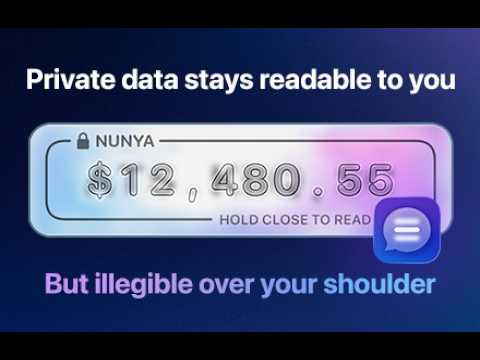
Make your browser snoop-safe. Nunya masks details on web pages, making them much harder to read over your shoulder.
Keep your finances to yourself. Nunya hides money amounts on the web pages you visit, so they stay easy for you to read but difficult for someone next to you to read. Nunya is a digital privacy screen for your browser: a new kind of "digital screen protector" for your data. Balances stay readable by you up close, and become hard to read for anyone sitting beside you or looking over your shoulder. Perfect for when you're working in a café, on a train, in an open-plan office or anywhere someone else might see your screen. AUTOMATICALLY AND PRIVATELY MASKS DATA Nunya finds money amounts for you: $1,250.00, £85, 1.200,50 €, ¥12,000, $2.4m and many more currencies and local formats. Standalone balances get a framed treatment, while amounts in sentences and table cells get a compact one that keeps your layout tidy. Nunya follows the page's own text alignment, so left-aligned figures stay left-aligned. After you install, Nunya asks once for permission to run on your sites. Press "Allow on all sites" and it starts protecting the pages you open. Nothing is read until you do, and no site data is ever transmitted. SET YOUR PRIVACY DISTANCE Nunya doesn't blur or black out your numbers. It redraws them in fine detail that your eyes can resolve at your normal distance from the screen, but that dissolves into texture as you move away. The Readable distance slider in the toolbar menu has three stops (Close, Medium and Far) and everything in between, with a live sample in Settings so you can tune it to your screen, your desk and your eyes. WORKS WHERE YOU WORK • Online banking and budgeting apps • Brokerage, investing and crypto dashboards • Accounting, invoicing, payroll and expense tools • Spreadsheets and reports, including Google Sheets • Shopping carts, receipts and order histories Google Sheets draws its grid on a canvas that most extensions can't reach. Nunya works there too: money amounts in your cells are replaced by Nunya's mask as the sheet draws them. YOU'RE IN CONTROL • Pause Nunya for the current site with one click. • Run it on every allowed site except those you exclude, or only on sites you choose. • Keep exact values such as $0.00 visible with the Never hide list. • Turn protection on and off with Alt+Shift+N, or the current site with Alt+Shift+M (changeable in your browser's shortcut settings). • Try the included sample banking page to see it working. USE IT FREE Money masking is free and stays free. Nunya Pro is a one-time purchase that unlocks more: there is no subscription and no account. Pro adds masking for: • Email addresses and phone numbers • Card numbers, bank accounts and IBANs • Government ID numbers and crypto wallet addresses • Unlabelled amounts and percentages • Your own words and patterns Nunya Pro is sold by Lavender Tech Limited through our payment provider, Polar, not by Google. After you buy, your licence key appears on the page you return to and on your Polar purchase page; paste it into Nunya's settings, or let Nunya fill it in for you. The key and a label for your browser are checked with Polar; nothing else is ever sent. Pro works on up to three of your browsers. Refunds: if Nunya Pro isn't right for you, email support@usenunya.com within 14 days of buying and we'll refund you in full. Your licence key will then be deactivated. FEATURES • Money masking for free • Close, Medium and Far readability settings • Automatic detection of many currencies and formats • Works in Google Sheets • Pause or restrict Nunya by site • Never hide list for values you want left visible • Keyboard shortcuts • Colour on or off, for a calmer neutral look • No account required PRIVATE BY DESIGN Everything happens on your device. Nunya reads page text only to find amounts, never sends page content anywhere, and has no account, no analytics and no tracking. Your original page text is left in place, so copying, find-in-page and screen readers keep working. Nunya is a visual privacy aid. It does its best to hide your data. It may miss something, and isn't a substitute for good device security. It changes how text looks; the original is still on the page, and screenshots, recordings and cameras can capture it. How well it works depends on your screen, zoom, lighting and eyesight. Text inside images, PDFs and editable fields isn't covered. Take appropriate care with sensitive information. Nunya was first released as PrivacyMessage over ten years ago, and is also available for iPhone.
5 out of 51 rating
Details
- Version0.3.2
- UpdatedNovember 18, 2026
- FeaturesOffers in-app purchases
- Size123KiB
- LanguagesEnglish
- DeveloperMarc Paul Howard KersteinWebsite
61 Longwood Gardens Ilford IG5 0ED GBEmail
support@usenunya.comPhone
+44 7941 345553 - TraderThis developer has identified itself as a trader per the definition from the European Union and committed to only offer products or services that comply with EU laws.
Privacy

Nunya: Digital Screen Protector has disclosed the following information regarding the collection and usage of your data. More detailed information can be found in the developer's privacy policy.
Nunya: Digital Screen Protector handles the following:
This developer declares that your data is
- Not being sold to third parties, outside of the approved use cases
- Not being used or transferred for purposes that are unrelated to the item's core functionality
- Not being used or transferred to determine creditworthiness or for lending purposes