

nuntius
3 ratings
)
Overview
Draft contextual replies from a Chrome side panel with local or CLI AI providers.
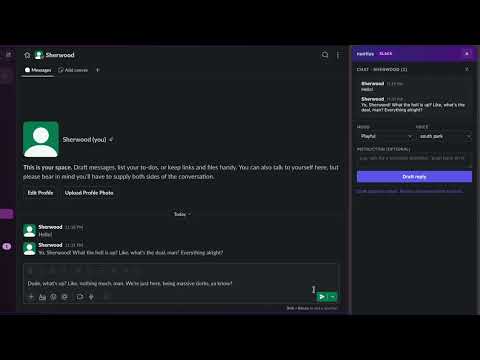
nuntius is a Chrome side-panel assistant that helps you draft replies without leaving the conversation you are already in. It works across supported messaging sites listed in the extension permissions. Open a supported conversation, then generate a suggested reply directly from the page context. The extension reads the recent visible conversation, lets you choose a tone, and inserts a draft into the correct composer so you can review and send it yourself. Why teams use nuntius: Works across multiple supported messaging sites in one extension. Drafts replies in context instead of making you copy and paste chats into another tool. Supports CLI-based AI providers through a local native host setup. Supports local models for private, on-device workflows. Lets you steer tone with moods like professional, direct, empathetic, playful, technical, or one-liner. Saves personal voice samples and optional profile details to better match your writing style. Includes a side panel that stays docked while you work. Supports light and dark theme syncing. Typical use cases: Catch up on a long thread and draft a polished response quickly. Rewrite a message to be more concise, warmer, firmer, or more executive-friendly. Answer internal questions in your own style with less typing. Keep sensitive workflows local by using an on-device model on your machine. How it works: Open a supported conversation in Chrome. Open the nuntius side panel. Choose your provider, tone, and optional instruction. Generate a draft. Review the inserted message before sending. Important notes: nuntius only works on the supported sites listed in the permissions section. CLI provider support requires a one-time local native host installation. Local model support requires a running local server and installed model. You stay in control of the final message. Drafts are inserted for review, not auto-sent.
5 out of 53 ratings
Details
- Version2.2.0
- UpdatedMay 19, 2026
- Offered bysherwood.lee
- Size337KiB
- LanguagesEnglish
- Developer
Email
maxpower.lee@gmail.com - Non-traderThis developer has not identified itself as a trader. For consumers in the European Union, please note that consumer rights do not apply to contracts between you and this developer.
Privacy

This developer declares that your data is
- Not being sold to third parties, outside of the approved use cases
- Not being used or transferred for purposes that are unrelated to the item's core functionality
- Not being used or transferred to determine creditworthiness or for lending purposes