


Overview
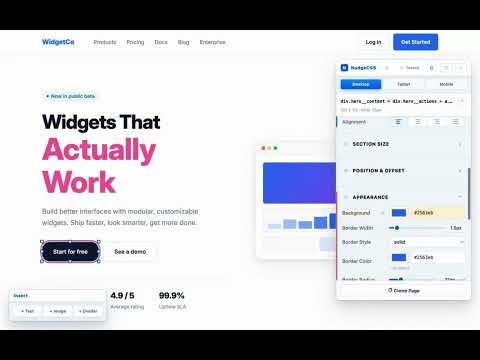
Click anything on your website and change how it looks: fonts, colors, spacing. See it live. No coding needed.
Change how your website looks by clicking on it. No coding needed. NudgeCSS is for people who run their own website and want to fix something their site editor won't let them change. A heading that is too small. A button in the wrong color. A font that doesn't match. HOW IT WORKS 1. Open your website in Chrome and click the NudgeCSS icon. 2. Click the thing you want to change. 3. Adjust it with sliders and color pickers. You see the change on the page right away. 4. When it looks right, export the change and paste it into your site's Custom CSS box. NudgeCSS shows you exactly what to paste. Until you paste it in, nothing on your real site changes. You can experiment freely and undo anything. WORKS WITH YOUR SITE NudgeCSS works on almost any website you can open in Chrome. To keep your changes, your site needs a place to paste custom CSS. Squarespace, WordPress, Shopify, and Wix Studio all have one. WHAT IS FREE NudgeCSS Basic is free with no time limit and no account. • Click any part of a page to select it • Change fonts, text size, and text color • Change colors, borders, and shadows • See every change live on the page • Undo any change • Save one page of a site as a standalone copy, to see how it turns out • Light and dark panel TRY EVERYTHING FREE FOR 7 DAYS Try every NudgeCSS Studio editing tool free for 7 days. Enter your email in the extension and we email you a code. No card needed. Exporting unlocks when you buy Studio. NUDGECSS STUDIO: $30, ONE TIME PAYMENT/LIFE TIME ACCESS Not a subscription. It never expires. • Export your changes, ready to paste into your site • Resize and move sections • Change how buttons and links look when the mouse is over them • Add text, images, and dividers • Preview your site at tablet and phone sizes • Change a color or font across the whole site at once • Edit the words on the page directly NUDGECSS BRIDGE+: $60, PAID ONCE For people moving a site or working with an AI assistant. Not a subscription. It never expires. • Everything in Studio • Save a whole Squarespace site as a standalone copy: tick the pages you want and get one zip, sorted into folders and ready to upload to a new host • The copy does not load anything from Squarespace, and the mobile menu keeps working • Get a page's text and structure as clean code to build on • Let an AI assistant such as Claude make edits with you PRIVACY NudgeCSS does not track your browsing, collect analytics, or read your passwords or form entries. Your edits stay in your browser. The extension contacts nudgecss.com only when you start a free trial or activate a purchase. It sends the email address and code you enter, nothing else. Purchases are handled by Stripe. Two optional features move data only on your own computer: Exact Clone saves a copy of the pages you choose to your downloads folder, and Send to Claude Code (Bridge+) passes your edits to an assistant running on your own machine. Why The free page copy is new in NudgeCSS 0.6.7, so "What is free" has to say so. Whole-site saving is new, and it is the main reason to buy Bridge+. The old privacy line said Exact Clone saves "the current page" and called it a Bridge+ feature. Both are now out of date: it can save several pages, and one page is free. Not claimed, on purpose "Any website": whole-site saving has been tested on two sites (one Squarespace 7.1, one Astro). Wix, and older Squarespace 7.0 templates, are untested. Full policy: nudgecss.com/privacy QUESTIONS Guide: nudgecss.com/guide Email: hello@nudgecss.com
0 out of 5No ratings
Details
- Version0.6.7
- UpdatedOctober 13, 2026
- FeaturesOffers in-app purchases
- Size111KiB
- LanguagesEnglish
- DeveloperWebsite
Email
hello@nudgecss.com - Non-traderThis developer has not identified itself as a trader. For consumers in the European Union, please note that consumer rights do not apply to contracts between you and this developer.
Privacy

NudgeCSS has disclosed the following information regarding the collection and usage of your data. More detailed information can be found in the developer's privacy policy.
NudgeCSS handles the following:
This developer declares that your data is
- Not being sold to third parties, outside of the approved use cases
- Not being used or transferred for purposes that are unrelated to the item's core functionality
- Not being used or transferred to determine creditworthiness or for lending purposes
Support
For help with questions, suggestions, or problems, please open this page on your desktop browser