

Nudge: Free Time Tracker for Consultants

Overview
Track billable time by client, project, and task—on the web or inside Salesforce. Private and free forever.
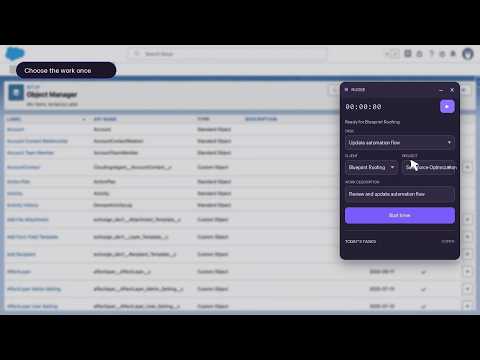
Stop reconstructing billable hours at the end of the day. Nudge keeps a private, free timer within reach while you work—then syncs every completed entry to the same Nudge account you use on the web. Built for consultants and small service teams, Nudge adds a compact, optional timer to work websites you explicitly enable. Start, pause, resume, and stop without leaving the current page. Choose the client, project, task, and description while the context is fresh. Review the result in Nudge Time or your connected Workspace. Nudge Time is free forever. No credit card is required. Key features: - Track time directly from work websites you enable - Select the correct client, project, and task - Create clients, projects, and tasks from the extension - Use the compact timer or expanded tracker - Start, pause, resume, and stop from the page or toolbar - Dock, collapse, move, hide, and restore the widget - Receive local reminders for tasks you create - Review time in the connected Nudge web app - Keep web and Chrome activity connected to the same account - Enable access separately for each work website For Salesforce, Nudge can turn an organization subdomain such as blueprintroofing.lightning.force.com into a client suggestion such as “Blueprint Roofing.” No Salesforce integration, API access, or Salesforce OAuth connection is required. Privacy first Nudge is designed for consultants who work with sensitive customer information. - Nudge uses only the hostname of an enabled website and anonymous mouse, scroll, and focus activity to determine when a reminder may be useful. - It stores tasks, due dates, and tracking selections entered by the user so it can display the next action and local reminders. - It does not read CRM records, customer data, page text, page titles, forms, keyboard input, cookies, passwords, authentication tokens, clipboard contents, downloads, or browser history. - It connects only to the trusted Nudge web application at https://nudge.crmhacker.com. Supabase access and refresh tokens are never shared with the extension. - Website and widget-placement preferences stay on the device. - Private client, project, task, and timer information remains isolated to the connected Nudge account in Chrome’s local extension storage. Nudge permanently requests website access only for nudge.crmhacker.com. Access to Salesforce and other work websites is optional and requested only when the user enables that website.
5 out of 51 rating
Details
- Version0.11.6
- UpdatedSeptember 4, 2026
- Size52.71KiB
- LanguagesEnglish
- DeveloperWebsite
Email
jonathan@crmhacker.com - Non-traderThis developer has not identified itself as a trader. For consumers in the European Union, please note that consumer rights do not apply to contracts between you and this developer.
Privacy

This developer declares that your data is
- Not being sold to third parties, outside of the approved use cases
- Not being used or transferred for purposes that are unrelated to the item's core functionality
- Not being used or transferred to determine creditworthiness or for lending purposes
Support
For help with questions, suggestions, or problems, please open this page on your desktop browser