

NPTEL Quiz Answer Hider

Overview
Hide quiz answers and feedback on NPTEL online courses to practice without seeing solutions
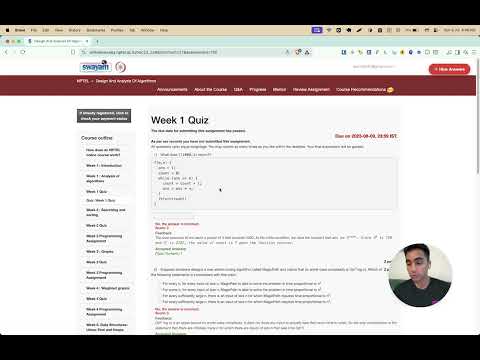
NPTEL Quiz Answer Hide Extension This is a Chrome extension designed to enhance your experience when studying NPTEL courses, especially in scenarios such as: You are taking a self-paced course, The course is over, or The course is on Week x+3 while you are working on Week x. Problem NPTEL typically displays quiz answers on the page after the due date has passed or if you missed a quiz. For those who like to audit courses and check their own answers, this can spoil the self-testing experience. Solution This extension automatically detects when you are on a quiz page and adds a functionality (via an overlay button) to display or hide the answers shown on the page. This is particularly helpful for learners who want to challenge themselves before viewing the official answers. Perfect for anyone who prefers to audit courses but still wants the option to check quiz answers at their own pace!
0 out of 5No ratings
Details
- Version1.0
- UpdatedJuly 8, 2025
- Offered byAnmol Tomer
- Size24.5KiB
- LanguagesEnglish
- DeveloperAnmol Tomer
Cubbon Rd FM Cariappa Colony, Sivanchetti Gardens Bengaluru, Karnataka 560038 INEmail
anmol3540@gmail.com - Non-traderThis developer has not identified itself as a trader. For consumers in the European Union, please note that consumer rights do not apply to contracts between you and this developer.
Privacy

NPTEL Quiz Answer Hider has disclosed the following information regarding the collection and usage of your data. More detailed information can be found in the developer's privacy policy.
NPTEL Quiz Answer Hider handles the following:
This developer declares that your data is
- Not being sold to third parties, outside of the approved use cases
- Not being used or transferred for purposes that are unrelated to the item's core functionality
- Not being used or transferred to determine creditworthiness or for lending purposes
Support
For help with questions, suggestions, or problems, visit the developer's support site