

Notion Time Tracker, Pomodoro Focus Timer & To-Do Task List by Flowtion

Overview
A daily planner, focus timer, and effortless time tracking — integrated to your Notion databases.
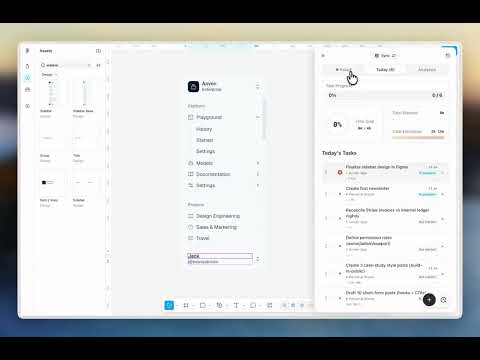
Flowtion brings a clean task manager to your Chrome tabs and embeds timer buttons into your Notion databases. Plan your day across workspaces, then work through your tasks in focus sessions — time logs automatically to the right task and project. The floating timer, sidebar & notifications keep you in deep work without switching tabs. View detailed analytics directly from the sidebar and export your data for reporting (Excel & CSV). Stop losing track of your hours and billable time, and get more done in Notion. Made for freelancers, solopreneurs, professionals & other high-performers. HOW IT WORKS 1. Connect your Notion account and databases Link the workspaces and databases your tasks live in. Connect your status and due-date properties, and Flowtion syncs every change automatically. No separate app to track your time. 2. Plan today's work Pick your tasks for the day across workspaces and databases. Set a time estimate per task and a daily focus goal. 3. Start a focus session Start a Pomodoro timer directly from a Notion task. Switch tasks from any tab, and your time logs automatically. Open timers and manual logging are supported too. 4. Get notified and take breaks The floating timer and browser notifications tell you when a session ends and summarize what you did. Break timers help you wind down before the next round. 5. Review your time and performance See analytics from your Notion database pages or the floating sidebar. Review where your time went across any date range, and track yourself against your daily goal. 6. Export for billing Get a clean Excel or CSV export across databases and date ranges, ready for accounting, invoicing, or sending to a client. WHAT YOU GET Serious productivity. — Two-way Notion sync. Always current with your Notion tasks and databases, not a one-time snapshot. — Task property management. Connect your status and due-date properties and manage them from Flowtion as you work. — Goals and estimates. Set daily focus goals and per-task time estimates for sharper planning. — Floating timer. See your active task and session on every Chrome tab, without breaking focus. — Pomodoro sessions. Classic, auto, and open timer modes, so there is a timer for the way you actually work. — Time tracking. Track any task during a focus session, run an open timer, or log time by hand. All of it ties back to Notion. — Notifications. Browser alerts when a session ends, with a summary of the work. — Focus analytics. See where your time goes and report billable hours with precision. Stop losing billable hours. — Excel & CSV export. Clean invoice-ready time sheets for reporting and clients. MADE FOR Freelancers, solopreneurs, and professionals who plan their work in Notion and need their logged hours to match what actually happened. FREE AND PRO Core features are free, up to 1 workspace and 1 database connection. Pro adds more connections (up to 3 workspaces and 10 databases), deeper analytics, and Excel and CSV export, as well as access to our existing roadmap of future features. You can cancel anytime and keep Pro until the end of your billing period. ON THE ROADMAP Planned features, not yet available. Pro includes access to these as they ship. Planning & Capture — Time blocking. Drop tasks into time slots and block out your day, so your plan matches your calendar. — Brain dump. Capture every stray thought in one place, then turn them into Notion tasks later. — Floating notes. Jot quick notes in a floating window without leaving your task or breaking focus. Billing & Estimates — Cost estimates. Set hourly rates and cost estimates per project. — Billable hours. Track billable hours per task and project. — Time & estimation sync. Display elapsed and estimated times right on your Notion database rows. Integrations — Calendar integration. Two-way sync with Google Calendar: push focus sessions out, pull events in, so planned and tracked time live together. — Accounting integration. Send tracked hours straight to your invoicing tool, ready to bill. AI — MCP server. Connect Flowtion to AI assistants over MCP — query your focus data and control timers from your own tools. — AI task & time management. Organize tasks and manage your time in natural language. — AI estimation. AI that helps you estimate task times and plan your day, based on your history. Apps — Mac app. A native Mac app so your timer and tasks live outside the browser too. — iOS app. Track focus and check your day on the go, synced with your Notion. FREQUENTLY ASKED QUESTIONS What is Flowtion? A Pomodoro timer and time tracker that lives inside Notion. Focus and track your time in full sync with your existing tasks and databases. Feels like a native Notion feature. Why choose Flowtion? There are many great time trackers out there, but only Flowtion integrates into your Notion like a native feature — with powerful tools to help you focus and get more done, not just track time. Do I need a Notion account? Yes. Flowtion connects to your Notion workspace to sync tasks and databases to your focus sessions. A free Notion account works fine. Is Flowtion an official Notion product? No — Flowtion is an independent tool built on Notion's public API. We're not affiliated with, endorsed by, or sponsored by Notion Labs, Inc. Notion is a trademark of Notion Labs, Inc. Is Flowtion free? Yes, you can try core Flowtion features for free. Upgrade to Pro for more database connections, detailed analytics & data export, plus upcoming power-user features. Can I export my hours for invoicing? Yes, on Pro. Export your tracked time by date range and database as an Excel file or CSV — ready to bill. Which browsers are supported? Chrome, plus other Chromium browsers like Edge, Brave, and Arc. Does Flowtion work with the Notion desktop or mobile apps? Flowtion's extension runs in your browser on Notion Web (Chrome and Chromium browsers) — it can't run inside Notion's native desktop or mobile apps, since those don't support browser extensions. You can still plan and track time from the Flowtion web app, and everything stays in sync with your Notion workspace. Is my Notion data safe? Yes. Flowtion syncs through the official Notion API and only stores lightweight links to your tasks — never your Notion page content. Your Notion access is encrypted at rest. Can I cancel or change my plan? Anytime, from your account billing settings (powered by Stripe). If you cancel, you keep Pro until the end of your billing period. Flowtion is an independent tool built on Notion's public API. It is not affiliated with, endorsed by, or sponsored by Notion Labs, Inc. Notion is a trademark of Notion Labs, Inc. Website: https://flowtion.so Support: support@flowtion.so Privacy policy: https://flowtion.so/privacy-policy
5 out of 52 ratings
Details
- Version1.0.8
- UpdatedAugust 11, 2026
- FeaturesOffers in-app purchases
- Size4.73MiB
- LanguagesEnglish
- Developer
- TraderThis developer has identified itself as a trader per the definition from the European Union and committed to only offer products or services that comply with EU laws.
Privacy

Notion Time Tracker, Pomodoro Focus Timer & To-Do Task List by Flowtion has disclosed the following information regarding the collection and usage of your data. More detailed information can be found in the developer's privacy policy.
Notion Time Tracker, Pomodoro Focus Timer & To-Do Task List by Flowtion handles the following:
This developer declares that your data is
- Not being sold to third parties, outside of the approved use cases
- Not being used or transferred for purposes that are unrelated to the item's core functionality
- Not being used or transferred to determine creditworthiness or for lending purposes
Support
For help with questions, suggestions, or problems, visit the developer's support site