

Notion PDF Export - Print and save Notion pages as PDF

Overview
Export Notion pages to clean PDFs and generate invoices from a database. Real text, correct page breaks, no watermark.
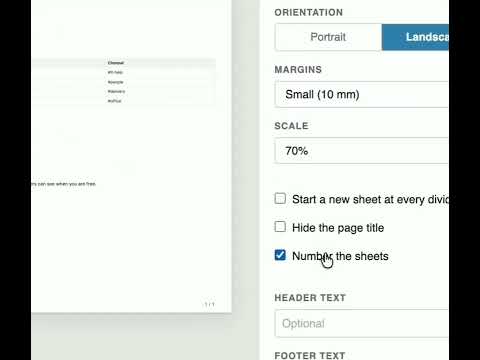
Export any Notion page to a PDF that looks right the first time, and turn a Notion database into finished invoices, certificates and letters. Notion PDF Export adds a PDF button next to Share. It turns the page into a proper document: searchable, selectable text instead of a screenshot, page breaks that fall between lines and table rows, and tables that are not cut off at the edge of the sheet. 👀 SEE EVERY SHEET BEFORE YOU PRINT The export panel shows each sheet at its real size, with its margins, header, footer and page number. Change the paper, orientation, margins or scale and the sheets update at once. 🧾 NOTION DOCUMENT GENERATOR Write an invoice, certificate or letter once in Notion and get a finished copy for every row of a database. Put the database and the template on one page, write {Client} or {Total} where a value belongs, and choose "Notion document generator" in the panel. The preview shows the first documents filled in, and all of them print in one go, each on its own sheet. For invoices, quotes, certificates, offer letters, name badges and labels. 📖 Guide: https://notion-pdf-export.com/notion-mail-merge 🆓 FREE, WITHOUT A WATERMARK Single pages are free and unlimited, and nothing is stamped on your documents. ✨ FEATURES - PDF button in the Notion top bar, right next to Share - Margins and scale, with the sheet staying the same size - Header, footer and page numbers on every sheet - A divider can start a new sheet - Collapsed toggles, columns, tables and databases included - Real text: search, select and copy from the PDF ⭐ PRO - Notion document generator: a finished document for every database row, from one template - Export a page together with its subpages, up to five levels deep - Several documents to a sheet, for labels and badges - Your logo in the header or footer of every sheet - Many documents in one print job 🔒 PRIVACY Your page content never leaves the browser. The extension reads the page you are viewing, builds the document locally and hands it to your browser's print dialog. It only reads your pages and never changes your workspace. Our server only learns whether your installation has a Pro licence and receives anonymous usage counts, such as how many exports were run. 🚀 HOW TO USE 1️⃣ Open any Notion page 2️⃣ Click PDF next to Share 3️⃣ Check the sheets, then print or save as PDF 💳 PRICING Free: unlimited single-page exports, no watermark Pro: $6.99 a month, or $59 a year Not affiliated with Notion Labs, Inc. Notion is a trademark of Notion Labs, Inc.
5 out of 52 ratings
Details
- Version1.0.5
- UpdatedOctober 28, 2026
- FeaturesOffers in-app purchases
- Size58.89KiB
- LanguagesEnglish
- DeveloperAlexander Masaru KagoshimaWebsite
c/o IP-Management #10049 Ludwig-Erhard-Straße 18 Hamburg 20459 DEEmail
info@trello-attachment-downloader.com - Non-traderThis developer has not identified itself as a trader. For consumers in the European Union, please note that consumer rights do not apply to contracts between you and this developer.
Privacy

Notion PDF Export - Print and save Notion pages as PDF has disclosed the following information regarding the collection and usage of your data. More detailed information can be found in the developer's privacy policy.
Notion PDF Export - Print and save Notion pages as PDF handles the following:
This developer declares that your data is
- Not being sold to third parties, outside of the approved use cases
- Not being used or transferred for purposes that are unrelated to the item's core functionality
- Not being used or transferred to determine creditworthiness or for lending purposes
Support
For help with questions, suggestions, or problems, visit the developer's support site