

Notion Palette - Customize Notion Color Palette

Overview
Customize Notion color palette with Notion Palette. Change colors for blocks, text, and backgrounds.
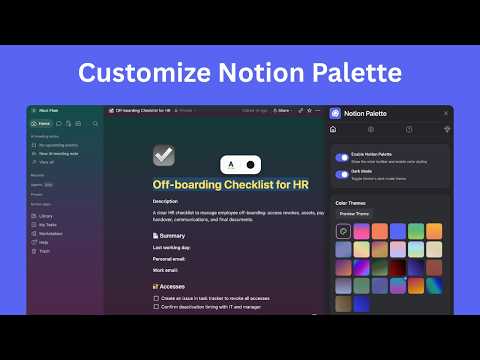
🚀 Notion Palette – Customize Your Notion Colors & Themes! Make Notion feel more personal, polished, and on-brand with Notion Palette – the simple Chrome extension for adding custom colors, brand palettes, text highlights, block backgrounds, and full-page color themes to your Notion workspace. Perfect for creators, teams, students, designers, marketers, founders, and anyone who wants their Notion pages to look clearer, calmer, and more beautiful. Turn your Notion workspace into a place that matches your style, your brand, and the way you think. 🌟 Why Choose Notion Palette? 1️⃣ Customize Text & Background Colors in Notion 🎨 ✅ Select text in Notion and instantly apply custom text or background colors. ✅ Click a Notion block to color the whole block, not just the selected text. ✅ Go beyond Notion’s built-in color options with solid colors, document colors, and custom HEX values. Great for: ✅ Highlighting important notes ✅ Creating visual priority systems ✅ Making dashboards easier to scan ✅ Adding personality to docs, wikis, and planners 2️⃣ Build Your Own Brand Color Palette 🧩 🔹 Save brand colors and reuse them across your Notion pages. 🔹 Keep your workspace consistent with your company, creator, or personal visual identity. 🔹 Quickly apply the same colors to headings, callouts, blocks, and highlighted text. Ideal for: • Team workspaces • Client portals • Content calendars • Project dashboards • Personal operating systems 3️⃣ Create Beautiful Full-Page Color Themes 🌈 Notion Palette lets you style the whole Notion page with color themes, including the sidebar, top bar, and main content area. Choose from built-in themes or create your own with: • 1–5 custom colors • Smooth solid backgrounds or gradients • Gradient direction controls • Color intensity controls • Light mode and dark mode support • Live previews before applying Try a theme for 10 seconds, see how it feels, and apply it when it fits your workspace. 4️⃣ Designed for Real Notion Workflows ⚡ Notion Palette is built to feel natural inside Notion: ✅ A floating toolbar appears when you select text. ✅ Block hover mode makes it easy to style entire Notion blocks. ✅ Colors are saved locally and restored when you return to the page. ✅ You can reset saved styles anytime from the extension settings. ✅ The extension can be enabled or disabled whenever you need a clean Notion view. 🔧 How to Use Notion Palette Getting started is simple: 1. Open Notion in your browser. 2. Enable Notion Palette from the extension panel. 3. Select text to open the color toolbar. 4. Choose Text color or Background color. 5. Pick from document colors, brand colors, Notion colors, solid colors, or a custom HEX color. 6. To style a full block, click the block and apply a text or background color. 7. Open Color Themes to preview, create, and apply full-page Notion themes. Your color choices are saved locally so your styled pages stay ready when you come back. 🔒 Privacy-Friendly by Design ✅ Your saved colors and themes are stored with Chrome extension storage. ✅ Notion Palette does not need broad browsing permissions. ✅ The extension only runs on Notion domains. ✅ You stay in control of your workspace styling. 💎 Upgrade to Pro – Unlock More Customization Go Pro to unlock the full Notion Palette experience: • Add brand colors • Create and save custom color themes • Apply full-page color themes • Priority support Free users can still explore colors and preview themes before upgrading. ⚠️ Disclaimer Notion Palette is an independent tool. It is not affiliated with, endorsed by, or connected to Notion Labs, Inc. Download Notion Palette today and make your Notion workspace finally feel like yours! 🚀
3.8 out of 56 ratings
Details
- Version1.1.0
- UpdatedMay 26, 2026
- Size187KiB
- Languages8 languages
- DeveloperWebsite
Email
ricciflow.io@gmail.com - Non-traderThis developer has not identified itself as a trader. For consumers in the European Union, please note that consumer rights do not apply to contracts between you and this developer.
Privacy

Notion Palette - Customize Notion Color Palette has disclosed the following information regarding the collection and usage of your data. More detailed information can be found in the developer's privacy policy.
Notion Palette - Customize Notion Color Palette handles the following:
This developer declares that your data is
- Not being sold to third parties, outside of the approved use cases
- Not being used or transferred for purposes that are unrelated to the item's core functionality
- Not being used or transferred to determine creditworthiness or for lending purposes
Support
For help with questions, suggestions, or problems, visit the developer's support site