

Notion-like Mail Formatting

Panoramica
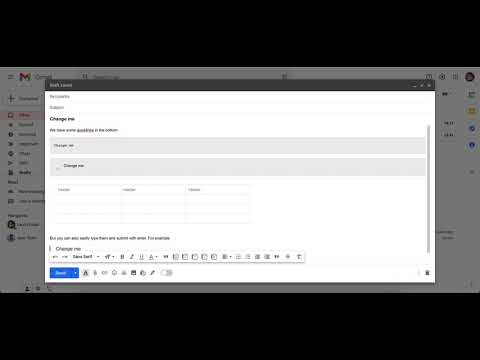
Use notion-like HTML elements while composing emails
Nothing is worse than reading long boring emails. Get your point across by writing easy to read emails with this chrome extension that creates Notion-like HTML elements simply by typing out shortcut commands like “/h1”, “/callout”, “/table 3x3” and more! Callout elements are also customisable by colour (“/callout red”) so you can highlight different types of information to your recipients.This extension also provides command shortcuts on commonly used Gmail formatting such as “/h1” for headers and “/quote” and more. Make your emails clearer and easier to understand without your fingers even leaving the keyboard! Try out with this full list of commands: ------ /callout /quote /code /h1 /h2 /h3 /divider /twocolumn /table ------ Format it using any of these colors: blue, red, yellow, green, pink, orange, purple. Simply add them to your command: "/callout red Hello" Now new, Tables. Use it like this: "/table 5x5"
4,5 su 52 valutazioni
Dettagli
- Versione1.0
- Ultimo aggiornamento:28 ottobre 2021
- Dimensioni200KiB
- LingueEnglish
- SviluppatoreSito web
Email
laurinstahl@gmail.com - Non commercianteQuesto sviluppatore non si è identificato come commerciante. Per quanto riguarda i consumatori nell'Unione Europea, tieni presente che i diritti del consumatore non sono applicabili ai contratti stipulati tra te e questo sviluppatore.
Privacy

Notion-like Mail Formatting ha comunicato le seguenti informazioni relative alla raccolta e all'utilizzo dei tuoi dati. Per informazioni più dettagliate, consulta le privacy policy dello sviluppatore.
Notion-like Mail Formatting gestisce quanto segue:
Questo sviluppatore dichiara che i tuoi dati:
- Non vengono venduti a terze parti, se non per i casi d'uso approvati.
- Non vengono usati o trasferiti per finalità non correlate alle funzionalità principali dell'elemento.
- Non vengono usati o trasferiti per stabilire l'affidabilità creditizia o per finalità di prestito.
Assistenza
Per ricevere assistenza in merito a domande, suggerimenti o problemi, apri questa pagina nel browser desktop