


ภาพรวม
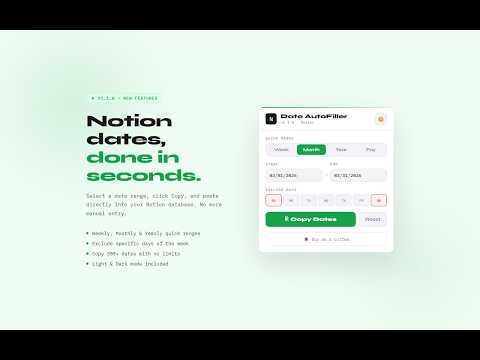
This Extension helps you to autofill the date in your Notion database.
Notion Date AutoFiller Notion Date AutoFiller is the fastest way to populate date columns in your Notion databases. Stop manually entering dates one by one. Select a range, hit Copy, and paste hundreds of dates instantly into Notion — no limits, no empty rows. ✨ What's New in v1.1.0: ✔️ Payment Mode — Generate recurring monthly payment dates (e.g. every 15th) across any range ✔️ Full-year support — Copy 300+ dates at once without truncation ✔️ Dark & Light mode — Remembers your preference across sessions ✔️ Quick ranges — Jump to Week, Month, or Year in one click ⚡ Core Features: ✔️ Set custom Start & End dates with ease ✔️ Exclude specific days of the week (perfect for skipping weekends) ✔️ One-click Copy — dates go straight to your clipboard, ready to paste into any Notion database ✔️ Lightweight, fast, and works entirely offline Built for Notion power users, freelancers, and anyone managing recurring schedules, payments, or project timelines. Available for: Chrome, Brave, and Edge. If this extension saves you time, a ★★★★★ rating means the world — thank you! ☕
4.6 จาก 5 คะแนนการให้คะแนน 13 รายการ
รายละเอียด
- รุ่น1.1.0
- อัปเดตแล้ว14 มีนาคม 2569
- นำเสนอโดยpratiiksaini
- ขนาด76.73KiB
- ภาษาEnglish (United States)
- นักพัฒนาซอฟต์แวร์
อีเมล
pratiiksaini@gmail.com - ไม่ใช่ผู้ค้านักพัฒนาซอฟต์แวร์รายนี้ไม่ได้ระบุว่าตัวเองเป็นผู้ค้า สำหรับผู้บริโภคในสหภาพยุโรป โปรดทราบว่าสิทธิของผู้บริโภคไม่มีผลกับสัญญาระหว่างคุณกับนักพัฒนาซอฟต์แวร์รายนี้
ความเป็นส่วนตัว

Notion Date Filler ได้เปิดเผยข้อมูลต่อไปนี้ซึ่งเกี่ยวกับการเก็บรวบรวมและการใช้ข้อมูลของคุณ ดูข้อมูลโดยละเอียดเพิ่มเติมได้ที่privacy policyของนักพัฒนาแอป
Notion Date Filler จะจัดการสิ่งต่อไปนี้
นักพัฒนาซอฟต์แวร์รายนี้ประกาศว่าข้อมูลของคุณจะ
- ไม่ถูกขายไปยังบุคคลที่สามหากไม่ใช่ Use Case ที่ได้รับอนุมัติ
- ไม่ถูกใช้หรือถูกโอนเพื่อวัตถุประสงค์ที่ไม่เกี่ยวข้องกับฟังก์ชันการทำงานหลักของรายการ
- ไม่ถูกใช้หรือถูกโอนเพื่อพิจารณาความน่าเชื่อถือทางเครดิตหรือเพื่อวัตถุประสงค์การให้สินเชื่อ
สนับสนุน
โปรดเปิดหน้านี้บนเบราว์เซอร์ในเดสก์ท็อป หากมีข้อสงสัย ต้องการขอคำแนะนำ หรือประสบปัญหาใดๆ