


Ringkasan
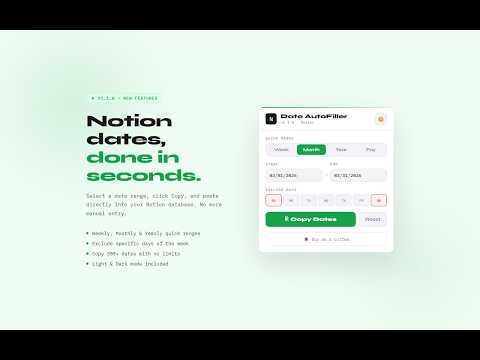
This Extension helps you to autofill the date in your Notion database.
Notion Date AutoFiller Notion Date AutoFiller is the fastest way to populate date columns in your Notion databases. Stop manually entering dates one by one. Select a range, hit Copy, and paste hundreds of dates instantly into Notion — no limits, no empty rows. ✨ What's New in v1.1.0: ✔️ Payment Mode — Generate recurring monthly payment dates (e.g. every 15th) across any range ✔️ Full-year support — Copy 300+ dates at once without truncation ✔️ Dark & Light mode — Remembers your preference across sessions ✔️ Quick ranges — Jump to Week, Month, or Year in one click ⚡ Core Features: ✔️ Set custom Start & End dates with ease ✔️ Exclude specific days of the week (perfect for skipping weekends) ✔️ One-click Copy — dates go straight to your clipboard, ready to paste into any Notion database ✔️ Lightweight, fast, and works entirely offline Built for Notion power users, freelancers, and anyone managing recurring schedules, payments, or project timelines. Available for: Chrome, Brave, and Edge. If this extension saves you time, a ★★★★★ rating means the world — thank you! ☕
4,6 dari 513 rating
Detail
- Versi1.1.0
- Diupdate14 Maret 2026
- Ditawarkan olehpratiiksaini
- Ukuran76.73KiB
- BahasaEnglish (United States)
- Developer
Email
pratiiksaini@gmail.com - Non-pedagangDeveloper ini tidak mengidentifikasi diri sebagai pedagang. Bagi konsumen di Uni Eropa, perlu diperhatikan bahwa hak konsumen tidak berlaku untuk kontrak antara Anda dan developer ini.
Privasi

Notion Date Filler telah mengungkapkan informasi berikut ini terkait pengumpulan dan penggunaan data Anda. Informasi lebih mendetail dapat dilihat di privacy policy developer.
Notion Date Filler menangani hal berikut:
Developer ini menyatakan bahwa data Anda
- Tidak dijual ke pihak ketiga, di luar kasus penggunaan yang disetujui
- Tidak digunakan atau ditransfer untuk tujuan yang tidak terkait dengan fungsi inti item
- Tidak digunakan atau ditransfer untuk menentukan kelayakan kredit atau untuk tujuan pinjaman
Dukungan
Untuk mendapatkan bantuan terkait pertanyaan, saran, atau masalah, buka halaman ini di browser desktop Anda