


Overview
Timestamped notes for YouTube videos with local search, export, and backup tools.
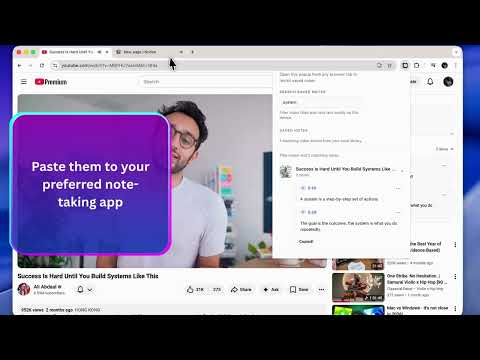
NoteFrames helps you capture timestamped notes while watching YouTube, then find and export them later without sending your notes to a server. Write notes in an inline panel beside YouTube videos. Each note is saved with the current timestamp, so you can jump back to the exact moment later. Features: - Timestamped notes on standard YouTube watch pages - Popup library for reviewing saved videos and notes - Local search across video titles and note text - One-click timestamp links back to YouTube - Markdown export for readable archives - JSON backup and restore for moving notes between Chrome profiles - Settings for export format and timestamp offset Privacy: NoteFrames is local-first. Notes and settings stay in your current Chrome profile through chrome.storage.local. There are no accounts, ads, analytics, cloud sync, AI processing, or remote note processing in this release. Important: Notes are local to the Chrome profile where they are created. Use JSON backup before uninstalling the extension, deleting your profile, or moving to another computer.
5 out of 51 rating
Details
- Version1.0.0
- UpdatedMay 2, 2026
- Size401KiB
- LanguagesEnglish (United States)
- DeveloperWebsite
Email
peterabraham.contact@gmail.com - Non-traderThis developer has not identified itself as a trader. For consumers in the European Union, please note that consumer rights do not apply to contracts between you and this developer.
Privacy

NoteFrames has disclosed the following information regarding the collection and usage of your data. More detailed information can be found in the developer's privacy policy.
NoteFrames handles the following:
This developer declares that your data is
- Not being sold to third parties, outside of the approved use cases
- Not being used or transferred for purposes that are unrelated to the item's core functionality
- Not being used or transferred to determine creditworthiness or for lending purposes
Support
For help with questions, suggestions, or problems, please open this page on your desktop browser