

NoteCue — Timestamped Video Notes

Overview
Create timestamped notes on YouTube videos and return to them from timeline markers.
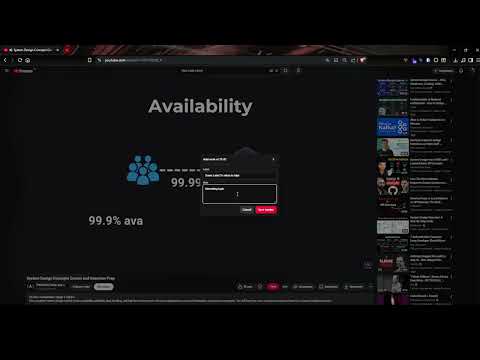
NoteCue helps you turn videos into organized, searchable study notes. Add timestamped notes while watching a video, write a short label, add context, and return to that exact moment later with one click. No more scrubbing through long videos trying to find the part you wanted to remember. Perfect for students, researchers, creators, online courses, tutorials, podcasts, lectures, and anyone who learns from video. Key features: • Add notes directly from the video page • Save the exact video timestamp automatically • Add a label so you remember what each note is about • Write longer notes for context, ideas, or reminders • View all saved markers in a clean list • Click any note to jump back to that moment instantly • Simple, lightweight, and built for focused watching Use it for: • Online lectures • Coding tutorials • Product reviews • Research videos • Language learning • Podcast highlights • Creator research • Study sessions NoteCue is designed to stay out of the way until you need it. Watch normally, mark important moments, and come back to them later without losing your place. Not affiliated with or endorsed by YouTube or Google.
0 out of 5No ratings
Details
- Version1.1.0
- UpdatedJune 12, 2026
- Offered byarditi
- Size1.02MiB
- LanguagesEnglish
- Developer
Email
xxbaldur9@gmail.com - Non-traderThis developer has not identified itself as a trader. For consumers in the European Union, please note that consumer rights do not apply to contracts between you and this developer.
Privacy

This developer declares that your data is
- Not being sold to third parties, outside of the approved use cases
- Not being used or transferred for purposes that are unrelated to the item's core functionality
- Not being used or transferred to determine creditworthiness or for lending purposes