

NotebookLM Web Importer
Overview
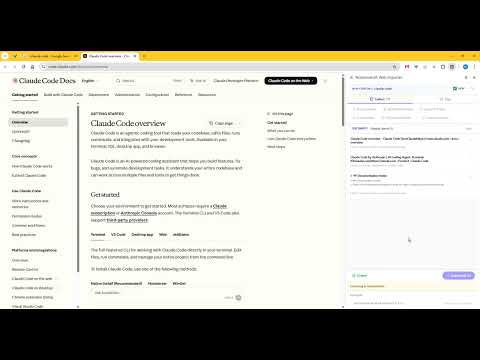
Import webpages, selected links, tabs, and YouTube playlists into NotebookLM.
NotebookLM Web Importer helps users quickly collect and send webpages, multiple tabs, selected links, selected text snippets, and YouTube playlists into NotebookLM. Its core purpose is to turn content that the user is already viewing and intentionally selecting in the browser into NotebookLM-ready sources, without repetitive copy-paste or manual source entry. Users should install it because it makes collecting research material into NotebookLM much faster and more organized. They can import the current page with one click, batch import multiple tabs, box-select links on a page, extract readable page text, collect links or text from the clipboard, and review everything in the side panel before sending it to a target notebook. For users who regularly research on the web, organize reference material, collect learning resources from YouTube, or build knowledge bases in NotebookLM, this extension reduces a fragmented workflow into a much simpler one.
0 out of 5No ratings
Details
- Version1.1.0
- UpdatedApril 8, 2026
- FeaturesOffers in-app purchases
- Offered byxukeek
- Size327KiB
- Languages2 languages
- Developer
Email
okeoke1011@gmail.com - Non-traderThis developer has not identified itself as a trader. For consumers in the European Union, please note that consumer rights do not apply to contracts between you and this developer.
Privacy

This developer declares that your data is
- Not being sold to third parties, outside of the approved use cases
- Not being used or transferred for purposes that are unrelated to the item's core functionality
- Not being used or transferred to determine creditworthiness or for lending purposes
Support
For help with questions, suggestions, or problems, please open this page on your desktop browser