

NotebookLM Tab Importer
4 ratings
)
Overview
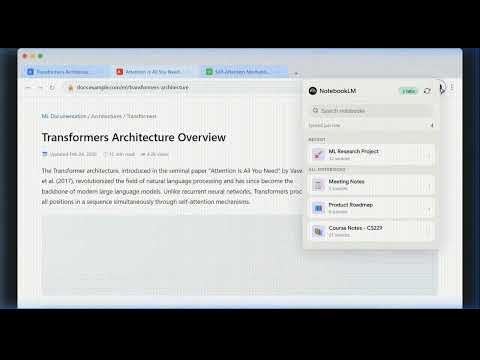
Browse your NotebookLM notebooks and upload selected browser tabs as sources — right from the toolbar.
NotebookLM Tab Importer The missing link between your browser and your research. Stop wasting time manually copy-pasting URLs or downloading PDFs just to get them into NotebookLM. With the NotebookLM Tab Importer, you can send any web page, research article, or document directly to your notebooks in a single click. Whether you're conducting deep research, organizing project materials, or just saving interesting articles for later, this extension streamlines your workflow so you can focus on the insights, not the admin. 🚀 Why you need it: Google NotebookLM is a powerful tool for synthesis, but getting your sources into it shouldn't be a chore. Effortless Research: Found a great source? Upload it instantly without leaving your current tab. Bulk Productivity: Got 10 tabs open for a project? Select them all and send them to your notebook in one go. Contextual Actions: Right-click any link on a page to "Add to Notebook" without even opening the link first. ✨ Key Features: One-Click Tab Uploading: Select your active tab (or multiple highlighted tabs) and upload them as sources instantly. Context Menu Integration: Right-click any link to send it directly to your chosen notebook. Searchable Notebook Library: Easily filter through hundreds of notebooks with the built-in lightning-fast search bar. Background Sync & Caching: Your notebook list is cached locally for instant loading, even on slow connections, and updates automatically in the background. Premium Design: A clean, minimal UI that feels like a native extension of the Google Workspace ecosystem. 🛠 How it works: Click the extension icon in your toolbar. Search or select the notebook you want to add sources to. Hit Upload. Your tabs are now sources in NotebookLM!
5 out of 54 ratings
Details
- Version1.0.1
- UpdatedMarch 17, 2026
- Offered byurigrk
- Size17.67KiB
- LanguagesEnglish
- Developer
Email
urigrk@gmail.com - Non-traderThis developer has not identified itself as a trader. For consumers in the European Union, please note that consumer rights do not apply to contracts between you and this developer.
Privacy

This developer declares that your data is
- Not being sold to third parties, outside of the approved use cases
- Not being used or transferred for purposes that are unrelated to the item's core functionality
- Not being used or transferred to determine creditworthiness or for lending purposes