

NotebookLM Exporter
6 ratings
)
Overview
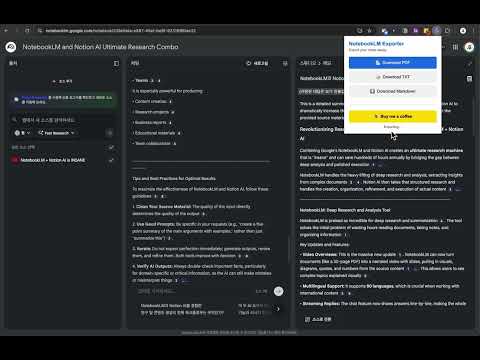
Export NotebookLM text content to PDF, TXT, and Markdown. Copy to clipboard feature included.
Save your Google NotebookLM insights instantly! Export content to PDF, TXT, and Markdown with a single click. Love NotebookLM but miss the ability to download your generated content? NotebookLM Exporter is here to bridge that gap. No more copy-pasting! Easily export your notes, summaries, and conversations into clean, usable files. - 📄 Multi-Format Support : Choose between PDF, TXT, and Markdown (MD). - 📋 Copy as Markdown : Copy content to clipboard in Markdown format to paste anywhere (Cmd+V/Ctrl+V). - ⚡ One-Click Export : Save your content instantly. - ✨ Clean Output : Automatically removes citation numbers for better readability. - 🌍 Font Safe : Generates PDFs with perfect rendering for all languages, including Korean. - ✂️ Smart Page Splitting : Handles long documents intelligently without cutting off text How to use: 1. Open NotebookLM. 2. Click the extension icon. 3. Select your desired format (PDF, TXT, MD) or click "Copy as Markdown". ------ Google NotebookLM의 인사이트를 클릭 한 번으로 소장하세요! PDF, TXT, Markdown 형식으로 즉시 다운로드할 수 있습니다. NotebookLM은 훌륭한 도구이지만, 생성된 결과물을 파일로 저장하는 기능이 없어 불편하셨나요? NotebookLM Exporter는 이러한 문제를 해결하기 위해 탄생했습니다. 이제 복잡한 복사-붙여넣기 없이, 소중한 노트와 요약 내용을 원하는 형식으로 깔끔하게 내보내세요. - 📄 다양한 포맷 지원 : PDF, TXT, Markdown(MD) 중 원하는 형식을 선택하세요. - 📋 마크다운 복사 : 마크다운 형식으로 클립보드에 복사하여 어디서든 붙여넣기(Cmd+V/Ctrl+V) 할 수 있습니다. - ⚡ 원클릭 다운로드 : 버튼 하나만 누르면 즉시 저장됩니다. - ✨ 깔끔한 정리 : 본문 내 불필요한 인용 번호(숫자)를 자동으로 제거하여 가독성을 높입니다. - 🇰🇷 완벽한 한글 지원 : PDF 변환 시 한글 폰트 깨짐 없이 깨끗하게 저장됩니다. - ✂️ 스마트 페이지 분할 : 긴 문서도 문장이 잘리지 않도록 자연스럽게 페이지를 나누어 PDF로 저장합니다. 사용 방법: 1. NotebookLM 페이지를 엽니다. 2. 확장 프로그램 아이콘을 클릭합니다. 3. 원하는 파일 형식(PDF, TXT, MD) 버튼을 누르거나 "Copy as Markdown"을 클릭하세요.
3.7 out of 56 ratings
Details
- Version1.1
- UpdatedDecember 6, 2025
- Size240KiB
- LanguagesEnglish (United States)
- Developer
Email
woolfie1101@gmail.com - Non-traderThis developer has not identified itself as a trader. For consumers in the European Union, please note that consumer rights do not apply to contracts between you and this developer.
Privacy

This developer declares that your data is
- Not being sold to third parties, outside of the approved use cases
- Not being used or transferred for purposes that are unrelated to the item's core functionality
- Not being used or transferred to determine creditworthiness or for lending purposes