

Note1 - Speech-to-Text Dictation, Voice/Video/Text Notes

Overview
Dictate and take notes in your side panel while you browse. Speech to text, voice, video and text notes.
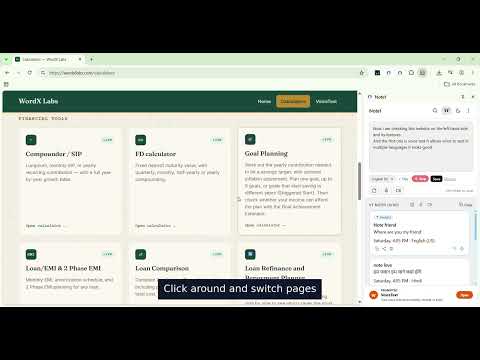
Quick Notes While You Browse - Side by Side Pin it in Chrome for quicker access. Live Dictation & Browsing (Voice to Text Mode) Browse the web and create notes at the same time. Speak naturally and watch your words appear live in VT Notes in your Note1 side panel, while you browse, edit, and move the cursor anywhere in your note. Punctuation is typed from your keyboard. Watch the promo video to see how it works. Live Dictation & Browsing (Voice/Audio Notes Mode) You can also dictate while you browse with Voice/Audio notes. How it works: open Note1, click the mic to record a voice note, and start dictating while you browse. Your voice is recorded as audio, and you can save each voice note with a title for quick search. Update 1.2.3- Voice to Text notes just got more reliable — now use Backspace to delete a wrong word and dictate the correction right into place, instead of it tacking onto the end. The VT editor also supports full physical keyboard typing now, not just voice. The VT mic button's permission flow is fixed, so first-time mic access on the VT Notes screen now opens a quick permission step. Note1 now supports 4 ways of writing notes: Text Notes, Voice (Audio) Notes, Video Notes, and the new optional Voice to Text (VT Notes) feature. VT Notes lets you dictate directly into Note1 instead of typing, with support for 21+ languages. One more way to write: a premium-style Word Pad in your side panel, for longer notes and drafts. *** *** *** Update 1.2.1 - 🎙️ Voice to Text notes — dictate directly into Note1. This optional feature is on a new screen. 🌐 Supports 21+ languages ✏️ Optional per-note title in voice to text notes (VT notes), typeable from the physical keyboard ⏎ Shift+Enter adds a line break mid-dictation without submitting on the Voice to Text screen *** *** *** Update 1.1.8 - Word pad now supports four font sizes — tap the size button in the action bar to switch between S, M, L and XL *** *** *** Update 1.1.2 - Introducing Search — find any note instantly across text notes, voice notes, video notes and word pad. Matched words highlighted in results. Tap any result to go there directly. Preview improvement — after recording a voice or video note, listen or watch it on the review screen before deciding to save or discard. Screenshot 4 — Search across Text, Voice and Video Notes *** *** *** Update 1.1.1 — Major Update Voice Notes — A stylish red recording screen with live waveform animation, real-time timer, and simultaneous Discard and Stop controls. After stopping, review your recording before saving — add an optional title or let it auto-name. Download any voice note directly to your device. Video Notes — Same clean recording flow as voice notes. Download any video note directly to your device. All recordings stay on your device. Nothing is uploaded. No account needed. To share a voice or video note via WhatsApp or Gmail, download it first using the download button — then attach and send from any apps. Screenshot 1 — New Voice to Text screen Screenshot 2 — Premium Word Pad Screenshot 3 — Text Notes, Voice Notes and Video Notes Screenshot 4 -- Search feature Screenshot 5 — Text Note shared directly to Gmail, pre-filled and ready to send. *** *** *** Update 1.0.9 - Introducing the Word Pad — a personal, premium writing surface built into your side panel. Warm red canvas, instant print to PDF and HTML download. Write alongside anything you browse. *** *** *** This extension provides ads within the extension interface, including in the side panel. *** *** *** Update 1.0.4 - Major update Share your notes directly while browsing This is the biggest update to Note1 since launch. You can now share any note or all notes at once directly from the side panel while you browse. Share options -- How it works -WhatsApp — opens WhatsApp or WhatsApp Web instantly with your note ready to send - Gmail — opens Gmail compose with your note pre-filled in the message body - X — opens X compose with your note ready to post - More — opens your device's native share options showing all available apps installed on your computer Every shared note includes the exact timestamp of when it was written — not just the text. Line spacing is preserved exactly as you typed it. Share a single note or tap the share icon in the header to share all notes at once. *** *** *** Full feature list: - Type notes using your keyboard - Text Notes - Voice Notes - Video Notes - Voice to Text (VT notes) Notes - optional feature - Word pad - A focused writing surface - Save, edit, and delete notes instantly - Share single note or all notes with one tap - Timestamp included in every share — exact date and time - Line spacing preserved when shared - WhatsApp, Gmail, X, and all other available apps via More - Works side by side while you browse — no tab switching needed - Dark mode toggle - Pin your most important note to the top - Sky blue highlight per note - Highlight important notes - Copy single note or copy all with timestamps - UI improvements - Scrollbar in color - Search feature - Different Font sizes for Word pad SIMPLE BY DESIGN - No account needed.
0 out of 5No ratings
Details
- Version1.2.4
- UpdatedOctober 18, 2026
- Size39.47KiB
- LanguagesEnglish (United States)
- DeveloperWebsite
Email
mapped.gosearch@gmail.com - Non-traderThis developer has not identified itself as a trader. For consumers in the European Union, please note that consumer rights do not apply to contracts between you and this developer.
Privacy

This developer declares that your data is
- Not being sold to third parties, outside of the approved use cases
- Not being used or transferred for purposes that are unrelated to the item's core functionality
- Not being used or transferred to determine creditworthiness or for lending purposes
Support
For help with questions, suggestions, or problems, please open this page on your desktop browser