

NoCookieBanner – EU Cookie Banner Auto Handler

Overview
Blocks EU cookie banners automatically. Rejects tracking first, or keeps only necessary cookies, or continues for free access.
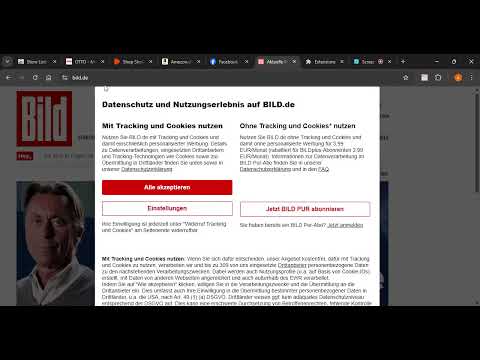
NocookieBanner removes annoying EU cookie popups and consent walls so you can actually use the site immediately. 🚀 HOW IT WORKS 1. First we try to reject tracking completely ("Reject all", "I do not agree", "Alle ablehnen"). 2. If that’s hidden, we choose only the strictly necessary cookies ("Nur notwendige Cookies", "Only essential"). 3. If the site hides that behind "Settings" / "Cookie-Einstellungen", we automatically open the settings, turn off marketing / tracking / personalization / analytics, and save the minimal consent for you. 4. If the site still blocks the page unless you “continue with ads” or “buy premium”, we choose the free option (continue with ads, continue for free) and we DO NOT click paid upsell buttons like “PUR”, “Plus”, “Werbefrei lesen”, “Ad-free subscription”, “Kostenfrei testen”, etc. Result: you get access to the content without being forced to accept all tracking or pay for an ad-free subscription. 🙌 WHAT YOU GET • Cookie banners and consent overlays disappear automatically. • Scrolling is unlocked on pages that try to freeze the site behind the banner. • Dark patterns are handled for you (tiny gray “Reject” button, or 4-click “Manage settings → turn off tracking → save”). • Works on major German news and media sites that try to force “Agree + Continue” or “Buy PUR”. • Works with modern consent systems (OneTrust, Sourcepoint, Quantcast, Cookiebot, Usercentrics, etc.). 🔍 PRIORITY LOGIC We always act in this order: 1. Reject all tracking if possible. 2. Otherwise allow only strictly necessary / required cookies. 3. Otherwise open settings, disable tracking categories (marketing, ads, analytics, personalization, partner tracking, social media), and save. 4. As a last fallback, continue with the free version ("Continue with ads", "Kostenlos weiterlesen") — never the paid “ad-free” or “PUR/Plus” option. ⚠️ NO DARK PATTERN TRAPS We avoid clicking: • "PUR", "WELT PUR", "SPIEGEL PUR", "BILDplus", "ZEIT Plus" • "Werbefrei lesen", "Ad-free subscription", "Upgrade", "Jetzt abonnieren" • "Kostenfrei testen", "Kostenlos testen", "Werbefrei für 3,99 €" We will NOT automatically buy or start a trial. We only choose the path that keeps access free. 🧠 EASY CONTROL • The extension icon popup shows if the current page was handled (for example: "Cookies handled ✅"). • You can turn the extension ON or OFF at any time. * ON = banners are auto-handled and hidden. * OFF = the site behaves normally and shows its cookie dialog. • After switching ON/OFF, there is a "Refresh Page ↻" button to reload the current tab so you can instantly see the difference. 🔎VISUAL FEEDBACK • The extension badge shows a checkmark (✓) when a cookie banner was automatically handled on that tab. • The popup shows the current status for the page: * Cookies handled ✅ * Disabled 🚫 * No banner 👌 🛡 PRIVACY • NoCookieBanner does NOT collect, store, sell, or upload your browsing data. • It does NOT send consent decisions to any server. • It does NOT track which sites you visit. • The only thing stored is whether the extension is currently ON or OFF. This is saved locally using the browser’s built-in storage. • All detection and clicking happens locally in your browser. ⚙️ TECH DETAILS • Works very early in the page load to beat aggressive consent walls. • Understands cookie banners in German and English, including phrases like "Zustimmen und weiter", "Kostenlos weiterlesen", "Mit Werbung fortfahren", "Agree and continue", "I do not agree". • Supports banners inside shadow DOM and inside iframes (many publishers load their consent wall in an iframe from a consent vendor). • Detects and handles common EU consent frameworks on large news portals, shopping sites, and media sites. 💡WHY THIS EXTENSION EXISTS Websites in the EU must ask for consent, but many make it painful to say no. Examples: • "Reject all" is hidden behind 3 clicks. • The "Accept all" button is huge and green, the "Only necessary cookies" link is tiny gray text. • Some websites pretend you only have a “choice” between full tracking or paying for a subscription. • Some sites block scrolling completely until you accept. NoCookieBanner exists to give you your time back. You shouldn’t have to fight a popup every time you open a link. You shouldn’t have to read 6 dialogs just to say “no thanks” to ad tracking. You definitely shouldn’t be tricked into a paid “ad-free” product just to read one article. ✅ Summary • Blocks cookie banners and consent walls automatically. • Rejects tracking whenever possible. • Falls back to “only necessary” or minimal consent. • Lets you continue for free with ads instead of paying for a “premium / PUR / ad-free” plan. • Gives you control with a simple ON/OFF switch. • Respects your privacy
0 out of 5No ratings
Details
- Version0.3.5
- UpdatedNovember 7, 2025
- Offered byAhmad Mostafa
- Size754KiB
- LanguagesEnglish
- Developer
Email
ahmadmostafade@gmail.com - Non-traderThis developer has not identified itself as a trader. For consumers in the European Union, please note that consumer rights do not apply to contracts between you and this developer.
Privacy

This developer declares that your data is
- Not being sold to third parties, outside of the approved use cases
- Not being used or transferred for purposes that are unrelated to the item's core functionality
- Not being used or transferred to determine creditworthiness or for lending purposes