

Lock In

Overview
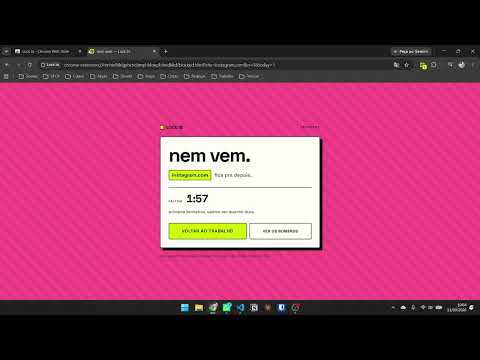
Locks the sites that derail you for as long as you choose - and counts every time you try to sneak back.
Block distracting websites, lock into deep work with a focus timer or Pomodoro cycles, and see every time you tried to sneak back. Most website blockers just say no and move on. Lock In keeps the receipt—counting every blocked attempt per site so at the end of a session you know whether you truly focused or reached for the same tab nine times in forty minutes. - Focus timer & Pomodoro mode: set a single session (15 to 90+ min) or run configurable Pomodoro rounds with automatic short and long breaks - Domain, path, or keyword blocking: shut down youtube.com/shorts while keeping lectures open, or block entire distracting sites - Attempt counter on every block: each detour is tallied per site and per day, and shown right on the block page - Focus stats & 14-day summary: track completed sessions, total focus time, streaks, and your top distractions - 9 languages built in: English, Português, Español, Français, Deutsch, Italiano, 日本語, 한국어, and 简体中文 No account. No sign-up. No servers, no analytics, no telemetry—the extension makes zero network requests and asks for no permission to read page contents. Your block list and stats stay 100% local on your machine. Free and open source: github.com/bernardomcma/lockin-chrome-extension
5 out of 52 ratings
Details
- Version1.2.2
- UpdatedNovember 24, 2026
- Offered bybernardomcma
- Size117KiB
- Languages9 languages
- Developer
Email
contact@bernardomcma.dev - Non-traderThis developer has not identified itself as a trader. For consumers in the European Union, please note that consumer rights do not apply to contracts between you and this developer.
Privacy

This developer declares that your data is
- Not being sold to third parties, outside of the approved use cases
- Not being used or transferred for purposes that are unrelated to the item's core functionality
- Not being used or transferred to determine creditworthiness or for lending purposes
Support
For help with questions, suggestions, or problems, visit the developer's support site