

Pin Data Connect: Pinterest, Facebook, Google & Bing Product Catalogs

Overview
Add any product page to your Pinterest, Facebook, Google, or Bing product catalog in one click. Builds your product feed for you.
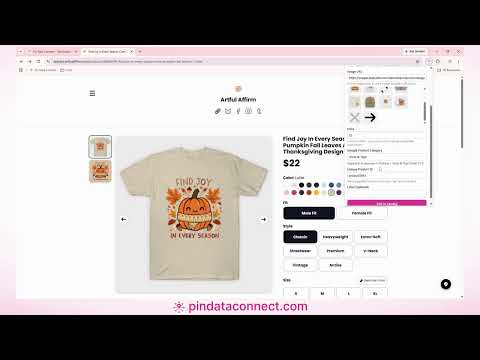
Add products to your Pinterest, Facebook, Google, and Bing product catalogs straight from any product page. Pin Data Connect reads the title, description, price, and image for you, so building a product feed takes one click instead of a spreadsheet. Pin Data Connect builds and hosts your product catalog. Every plan includes a private data source URL that Pinterest Catalogs, Meta Commerce Manager, Google Merchant Center, and Microsoft Merchant Center read automatically. This extension is the fastest way to fill that catalog. HOW IT WORKS 1. Open a product page: your own shop, a marketplace listing, or any product you sell. 2. Click the Pin Data Connect icon. It pre-fills the title, description, price, main image, and SKU, GTIN, or MPN when the page has them. 3. Pick a Google Product Category (5,400+ built in, searchable by any word), check the details, and click Add to Catalog. 4. That's it. The product is in your catalog feed, and Pinterest, Facebook, Google, and Bing pick it up on their next scheduled fetch. FEATURES • One-click product capture: title, description, price, image, and product identifiers • Image picker: choose any photo on the page, or paste an image URL • Built-in Google Product Category search, accepted by Pinterest, Facebook, Google, and Bing • Clothing and shoes: asks for age group, gender, color, and size only when the category needs them • Suggested product IDs, so every item gets a unique ID without you keeping count • Combined plans: add one product to Pinterest and Facebook, Google and Bing, or all four catalogs at once • Edit any field before adding. Nothing is saved until you click Add to Catalog FOR PIXELS AND FINE ART AMERICA ARTISTS Open one of your artwork pages and click "Import All Products". The extension reads every product type that artwork offers, with its current prices, and adds them all to your Pixels Pro/Fine Art America catalog in one go. On an Enhanced plan, "Import All Products & Variants" adds every size, frame, and mat too. Each imported artwork is marked as processed on your Manage Artworks page, so you always know which ones are left. FOR DASHERY SELLERS Open one of your Dashery product pages and the extension recognizes its product type, then adds it to your Dashery to Pinterest catalog. SUPPORTED PRODUCT CATALOGS • Pinterest, Facebook, Google, and Bing Product Catalog Builder (Basic and Enhanced) • Pinterest & Facebook, Google & Bing, and All-Platform Combo Product Catalog Builder • Pixels Pro/Fine Art America to Pinterest Product Catalog Builder • Dashery to Pinterest Product Catalog Builder WHO IT'S FOR Small shops, makers, artists, and print-on-demand sellers who want their products in Pinterest shopping, Facebook and Instagram shops, Google Shopping, and Microsoft Shopping, without hand-editing CSV files or XML feeds. FREQUENTLY ASKED QUESTIONS Do I need a Pin Data Connect account? Yes. The extension adds products to your Pin Data Connect catalog. Plans start at $5/month, each with a free 7-day trial. See pindataconnect.com/pricing. Do I have to deal with CSV or XML files? No. Pin Data Connect builds the format each platform expects (CSV for Pinterest, Facebook, and Bing; XML for Google) and serves it from your private data source URL. You paste that URL into the platform once. Does it work on any website? It works on most product pages. It reads the product details the page publishes for search engines and social sharing, then the page itself. If something is missing, type it in before adding. Can I add a product to more than one catalog? Yes. With a combined plan, one click adds the product to Pinterest and Facebook, Google and Bing, or all four. How do I get my catalog into Pinterest? Add your Pin Data Connect data source URL in Pinterest Catalogs. Pinterest reads it on its own schedule, and your products become shoppable Product Pins. Facebook, Google, and Bing work the same way. Does the extension track my browsing? No. It only reads the page you're on when you click its icon. It never runs in the background and never monitors your browsing. It uses your existing Pin Data Connect login, so there's no separate password. PRIVACY AND TERMS Privacy Policy: pindataconnect.com/privacy Terms of Service: pindataconnect.com/terms Help Center: pindataconnect.com/help
0 out of 5No ratings
Details
- Version1.0.6
- UpdatedOctober 29, 2026
- Size40.55KiB
- LanguagesEnglish (United States)
- DeveloperPin Data Connect, LLCWebsite
3 Cherry Dr Ct Ocala, FL 34472-9032 USEmail
support@pindataconnect.com - Non-traderThis developer has not identified itself as a trader. For consumers in the European Union, please note that consumer rights do not apply to contracts between you and this developer.
Privacy

Pin Data Connect: Pinterest, Facebook, Google & Bing Product Catalogs has disclosed the following information regarding the collection and usage of your data. More detailed information can be found in the developer's privacy policy.
Pin Data Connect: Pinterest, Facebook, Google & Bing Product Catalogs handles the following:
This developer declares that your data is
- Not being sold to third parties, outside of the approved use cases
- Not being used or transferred for purposes that are unrelated to the item's core functionality
- Not being used or transferred to determine creditworthiness or for lending purposes
Support
For help with questions, suggestions, or problems, please open this page on your desktop browser